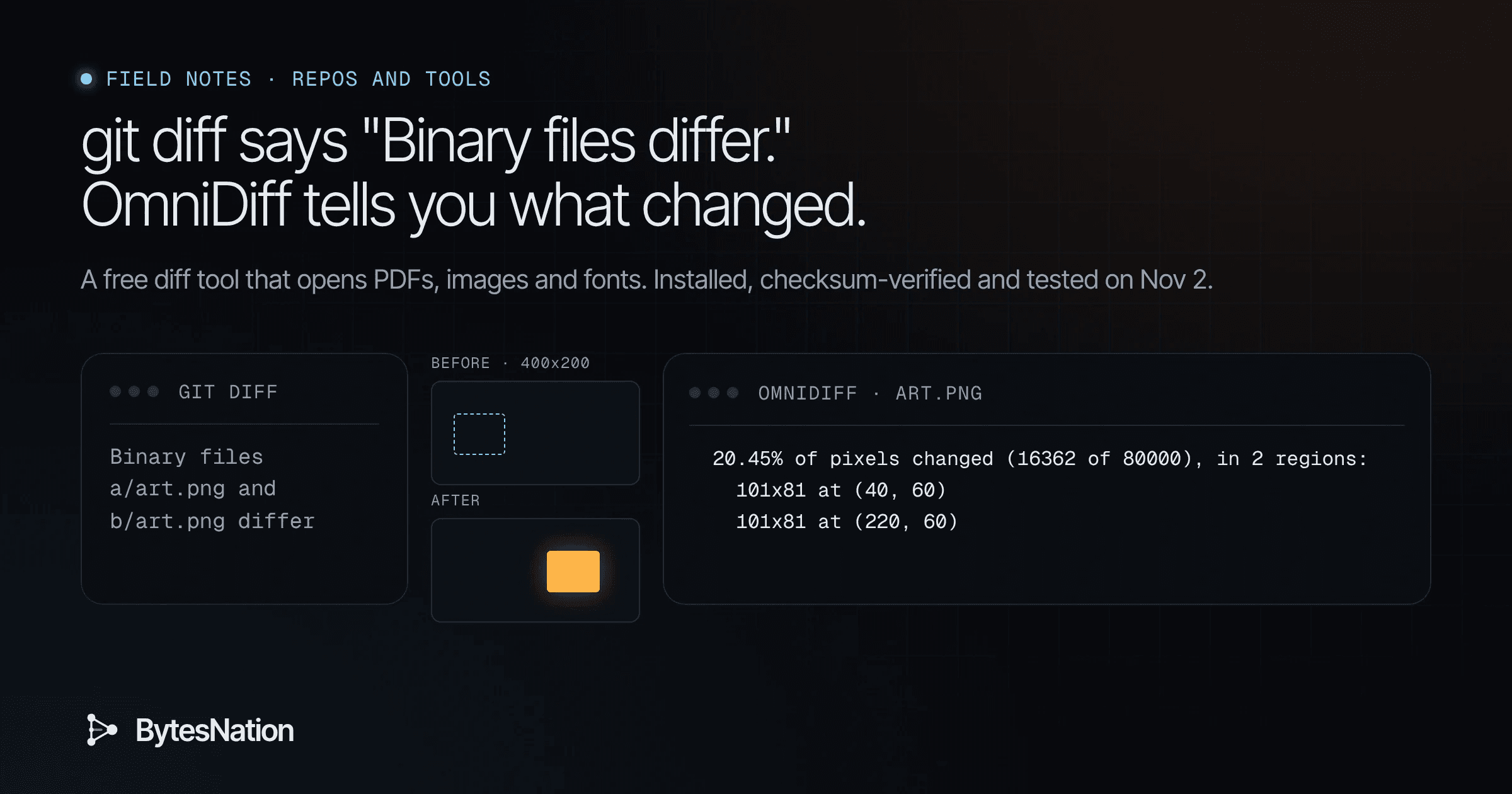
A field note on OmniDiff v0.3.0. Facts and tests as of Nov 2, 2026.
The short version
OmniDiff is a free diff tool written in Rust. It compares code by its structure instead of line by line, so it can say “this line moved” or “this one value changed” instead of “this whole block was deleted and rewritten.” It also opens files that GitA distributed version control system that tracks changes to files over time, enabling collaboration, branching, and complete history of every modification. Read more → treats as a black box. Give it two PNGs, two PDFs or two fonts and it reports what changed inside them.
Version 0.3.0 came out on Nov 1, 2026, and a Show HN post went up the same day.
I downloaded the official Linux build, checked it against the published checksums, and ran it on two tagged releases of a real open-source project. Then I made my own PNG, PDF and font files and diffed those too, both directly and through Git. Every output below is copied from my terminalThe window or screen where you type text commands and read their output, connected to a shell that runs those commands. Read more →. Where I didn’t test something, I say so.
What a diff is, and why “Binary files differ” is useless
A diff is a report of what changed between two versions of a file. Every code review, every “what did I touch in this config?” and every Git commit you look at goes through one.
Classic diff tools compare text one line at a time. That works fine until it doesn’t. SwapDisk space the operating system uses as overflow when physical memory (RAM) fills up, at the cost of being much slower than RAM. Read more → two lines and the tool reports a deletion and an addition. Rename one variable that appears on five lines and you get five removed lines and five added ones, and you have to find the real change by eye.
Files that aren’t plain text are worse. A PDF, a PNG, a font or a zip is “binary” as far as Git is concerned, and this is all you get:
$ diff inputs/before.png inputs/after.png
Binary files inputs/before.png and inputs/after.png differ
That tells you the file changed. You already knew that, because you changed it.
Some terms before we go further:
- Syntax-aware diff: the tool parses the code into its parts (functions, arguments, statements) and compares those, not raw lines.
- Tree-sitter: an open-source parser library that turns source code into a tree. OmniDiff uses tree-sitter grammars for its code languages.
- External diff / difftool: Git settings that hand the diff job to another program.
- ChecksumA fixed-length string produced by running a file through a hash function, used to verify the file has not been corrupted or modified. Read more → (SHA256): a fingerprint of a file. If the fingerprint of your download matches the one the project published, the file arrived unaltered.
Your first step: install it and check the download
This is the whole install on x86_64 Linux. It downloads the release tarball and the project’s checksum list from the same v0.3.0 release, checks the tarball, unpacks it and prints the version.
B=https://github.com/ivankovic/omnidiff/releases/download/v0.3.0
curl -sLO $B/omnidiff-x86_64-unknown-linux-gnu.tar.gz
curl -sLO $B/SHA256SUMS.txt
grep x86_64-unknown-linux-gnu SHA256SUMS.txt | sha256sum -c
tar xzf omnidiff-x86_64-unknown-linux-gnu.tar.gz
./omnidiff --version
What I got:
omnidiff-x86_64-unknown-linux-gnu.tar.gz: OK
omnidiff 0.3.0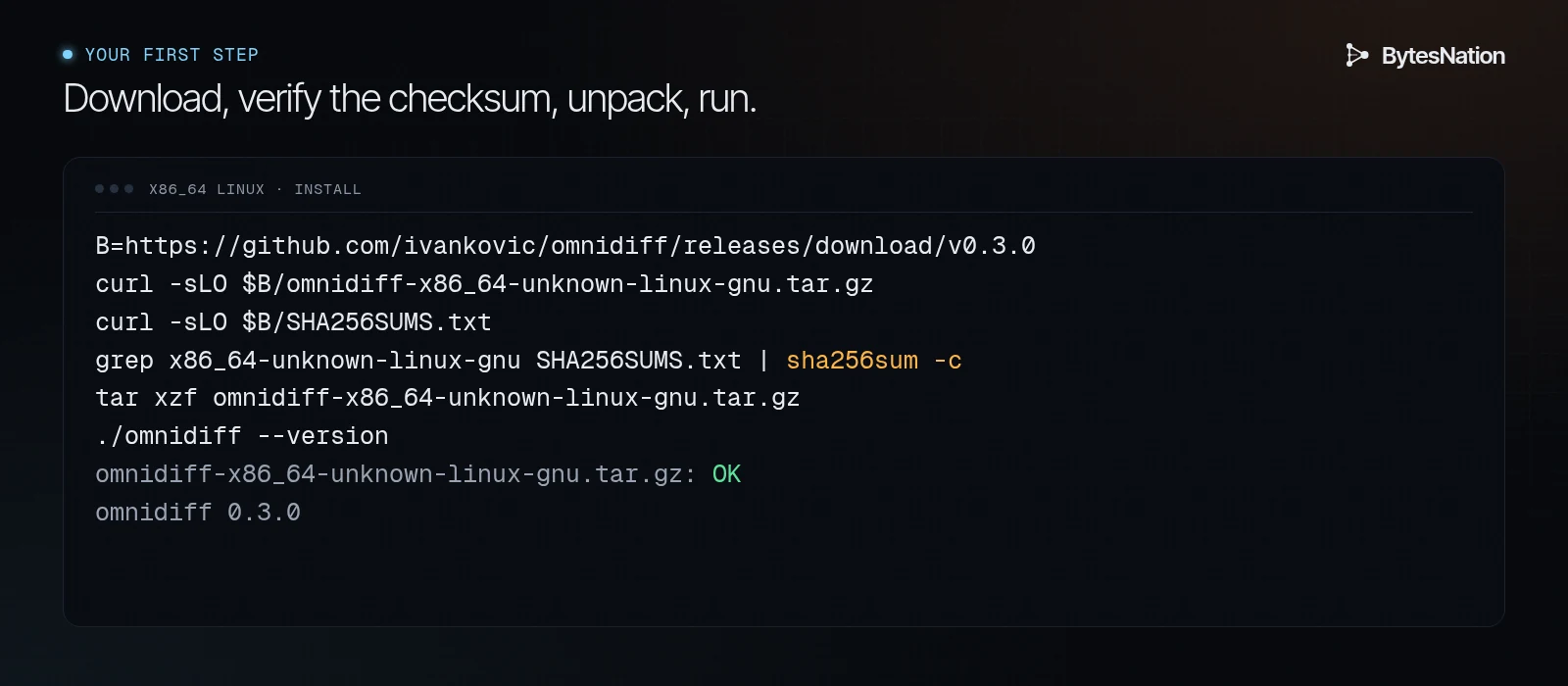
If sha256sum -c prints anything other than OK, stop and download again. Don’t run the binary.
The release also has builds for ARM Linux, macOS (Intel and Apple Silicon), Windows, musl Linux, and .deb packages, all listed on the releases page. The README also documents a signed apt repository and cargo install --locked omnidiff. I didn’t test those. The README says the cargo build needs rustc 1.92 or newer plus a C compiler and takes a few minutes, so the prebuilt binary is the fast way to try it.
The unpacked binary is 54,222,712 bytes, about 54 MB. That’s big for a CLI tool, and it matters if you plan to bake it into CI images.
Then try your first diff. Pick any file you’ve edited and diff the old copy against the new one:
./omnidiff --headless old.py new.py--headless prints plain text instead of opening the full-screen viewer. The README says headless mode also turns on by itself whenever output goes to a pipeThe | operator that sends one command's output directly into the next command's input, letting small tools be chained into a single job. Read more → or a file.
Test 1: a real repo, two tags
I cloned hexyl, an open-source hex viewer written in Rust, and pulled src/main.rs from the v0.15.0 and v0.16.0 tags. Between those releases, the author added a --print-color-table flag and an error for when you point hexyl at a directory.
git show v0.15.0:src/main.rs > hexyl-v0.15.0-main.rs
git show v0.16.0:src/main.rs > hexyl-v0.16.0-main.rs
NO_COLOR=1 ./omnidiff --headless hexyl-v0.15.0-main.rs hexyl-v0.16.0-main.rs
Here’s an excerpt of the “after” side. In this view, + is an added line, ~ is a changed line, and | marks a line that moved:
240    fn run() -> Result<()> {
241        let opt = Opt::parse();
242
243  +     if opt.print_color_table {
244  +         return print_color_table().map_err(|e| anyhow!(e));
245  +     }
246
247        let stdin = io::stdin();
248
249        let mut reader = match opt.file {
250  +         Some(filename) => {
251  ~             if filename.is_dir() {
252  +                 bail!("'{}' is a directory.", filename.to_string_lossy());
253  +             }
Moved from line 237
254 |+             let file = File::open(&filename)?;
--------------------
255
256  +             Input::File(file)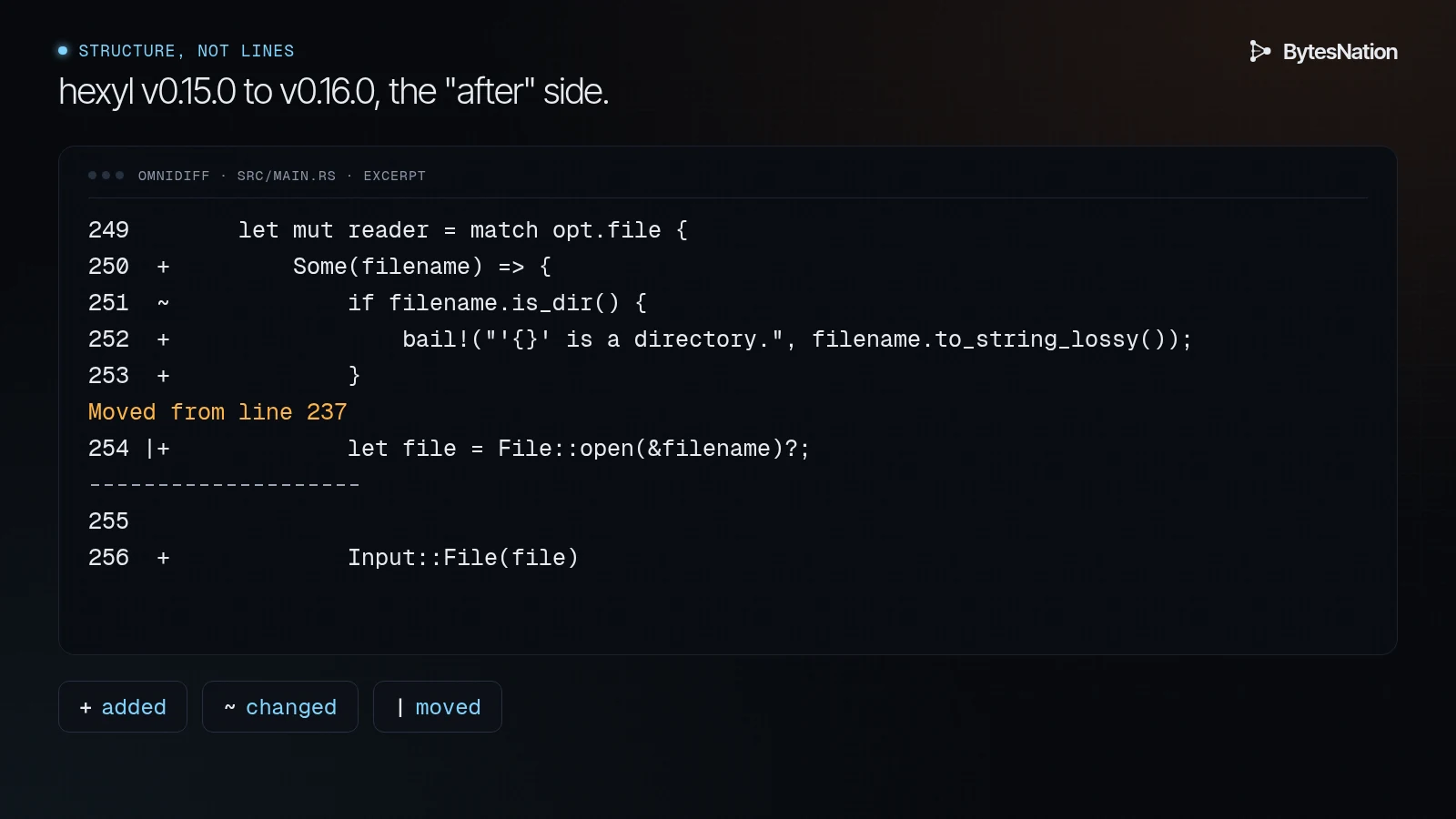
And the matching “before” side:
236        let mut reader = match opt.file {
Moved to line 254
237 |~         Some(filename) => Input::File(File::open(filename)?),
Two things stood out. Long unchanged stretches collapse to lines like ... 233 unchanged lines ..., and each hunk starts with the enclosing function (231 @ fn run() -> Result<()> {), so you know where you are in a 700-line file. And OmniDiff linked the old one-line File::open match arm to the new let file = File::open(&filename)?; line as a move. That pairing is partly a judgment call, since the line was rewritten as well as moved. It’s still more useful than the plain-diff answer, which shows the old line deleted and a pile of new lines added.
Test 2: a picture, a PDF and a font
These are the cases the release notes promise and our research pass didn’t check. I made the files myself with free tools. A Python script draws two 400x200 PNGs with Pillow, where one box moves and changes color. It also cuts DejaVu Sans down to the letters A to C, then makes a second copy with D added and the font family renamed. For the PDF, I wrote a four-line text file, changed “Box 1: Router” to “Box 1: FirewallA security device or software that monitors and controls incoming and outgoing network traffic based on predefined rules. Read more →”, and turned both versions into PDFs with LibreOffice.
The PNG:
$ ./omnidiff --headless inputs/before.png inputs/after.png
Pictures inputs/before.png and inputs/after.png: PNG 400x200 RGB8, 796 bytes -> PNG 400x200 RGB8, 798 bytes
  20.45% of pixels changed (16362 of 80000), in 2 regions:
    101x81 at (40, 60)
    101x81 at (220, 60)
That’s correct. The box left (40, 60) and appeared at (220, 60).
The font:
$ ./omnidiff --headless inputs/before.ttf inputs/after.ttf
Fonts inputs/before.ttf and inputs/after.ttf: TTF, 6 members, 4316 bytes -> TTF, 7 members, 4508 bytes
  2 changed, 1 added, 0 removed, 4 unchanged
    changed  names: 2 lines removed, 2 added
    changed  metrics: 1 line removed, 1 added
    added    U+0044 D
Also correct. It found the new glyph by its Unicode code point and noticed the renamed family in the name table.
The PDF:
$ ./omnidiff --headless inputs/before.pdf inputs/after.pdf
Documents inputs/before.pdf and inputs/after.pdf: PDF, 2 members, 15885 bytes -> PDF, 2 members, 15762 bytes
  1 changed, 0 added, 0 removed, 1 unchanged
    changed  page 1: 0.04% of pixels changed, in 4 regions
This one needs a straight answer. OmniDiff found the right page and reported that a small area changed. It did not print “Router” became “Firewall.” The README says PDFs are compared page by page, with each page drawn, so in headless text mode a PDF change comes back as pixels and regions, not words. The README’s demo shows more detail in the interactive viewer. I didn’t test the viewer, so I can’t tell you what it shows for this file.
The author’s own benchmark table in the README also rates PDFs as the weakest format for speed, so treat PDF support as “tells you where to look” for now.
Test 3: plug it into Git
You don’t need to configure anything to try it with Git. The README documents a one-off environment variable. I made a scratch repo, committed the three files above, overwrote them with the “after” versions, and compared plain git diff with OmniDiff.
Plain Git:
$ git --no-pager diff
diff --git a/art.pdf b/art.pdf
index 45a967f..d50f848 100644
Binary files a/art.pdf and b/art.pdf differ
diff --git a/art.png b/art.png
index 70620d3..67c1dad 100644
Binary files a/art.png and b/art.png differ
diff --git a/art.ttf b/art.ttf
index 7437ce9..8a3ffa8 100644
Binary files a/art.ttf and b/art.ttf differ
Same repo, with OmniDiff as the external diff:
$ GIT_EXTERNAL_DIFF=omnidiff git --no-pager diff
Document art.pdf: PDF, 2 members, 15885 bytes -> PDF, 2 members, 15762 bytes
  1 changed, 0 added, 0 removed, 1 unchanged
    changed  page 1: 0.04% of pixels changed, in 4 regions
Picture art.png: PNG 400x200 RGB8, 796 bytes -> PNG 400x200 RGB8, 798 bytes
  20.45% of pixels changed (16362 of 80000), in 2 regions:
    101x81 at (40, 60)
    101x81 at (220, 60)
Font art.ttf: TTF, 6 members, 4316 bytes -> TTF, 7 members, 4508 bytes
  2 changed, 1 added, 0 removed, 4 unchanged
    changed  names: 2 lines removed, 2 added
    changed  metrics: 1 line removed, 1 added
    added    U+0044 D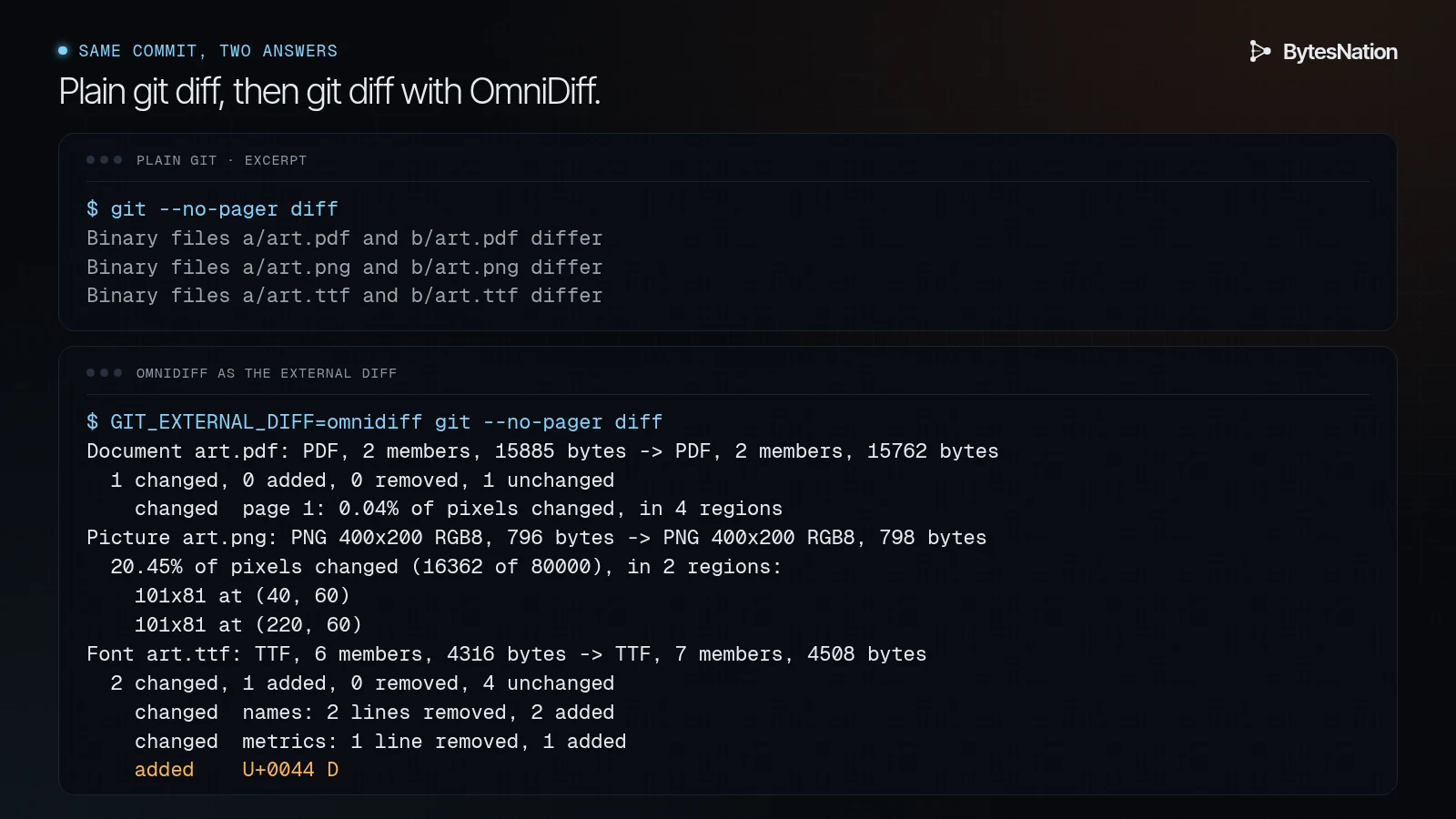
If you keep images, fonts or PDFs in a repo (docs sites, homelab diagrams, design assets), that second output is the reason to try this tool.
I also ran it on the hexyl clone across the two tags for Cargo.toml. It flagged the one changed line, version = "0.15.0" to version = "0.16.0", with a ~.
For the full-screen viewer from Git, the README says to use git difftool (git config difftool.omnidiff.cmd 'omnidiff "$LOCAL" "$REMOTE"', then git difftool --tool=omnidiff), or the interactive wizard omnidiff git configure. I didn’t test either one, because both need an interactive terminal. The README also documents a Jujutsu (jj) setup, which I didn’t test.
JSON for CI and editors
--mode json prints one JSON object. On the hexyl file it returned before and after sections, each with a path, a language ("Rust") and a list of hunks. Each hunk has an operation and a range:
{"operation": "insert", "range": {"start_row": 8, "start_column": 21, "end_row": 8, "end_column": 26}}Rows look zero-based, since that hunk sits on line 9 of the file. The README points to a JSON Schema in the repo, src/tui/json_output.schema.json, so read that before you build on the format. This is a 0.x release, and it could still change.
A first CI step, counting changed spans in a pull request:
$ omnidiff --mode json hexyl-v0.15.0-main.rs hexyl-v0.16.0-main.rs \
    | python3 -c "import json,sys; print(len(json.load(sys.stdin)['after']['hunks']))"
35
For a pass or fail gate, there’s --exit-code. By default OmniDiff exits 0 even when files differ, the same as git diff. With the flag, it exits 1 on a difference and 0 on a match. I checked both:
$ ./omnidiff --headless --exit-code inputs/before.pdf inputs/after.pdf
...
[exit=1]
$ ./omnidiff --headless --exit-code inputs/before.pdf inputs/before.pdf
Documents inputs/before.pdf and inputs/before.pdf: PDF, 2 members, 15885 bytes -> PDF, 2 members, 15885 bytes
  0 changed, 0 added, 0 removed, 2 unchanged
[exit=0]
The README says the exit code is 2 on an error. I didn’t trigger one.
The license: AGPL, and what that means at work
OmniDiff is licensed under the GNU Affero General Public License, version 3 only (AGPL-3.0-only). The LICENSE file in the release says so, and says it’s also available under a separate commercial license. GitHub’s sidebar shows “Other” for the license because of that dual-license header, so read the file, not the badge.
In practice:
- Installing it and using it on your own machine, in your homelab or on your team’s laptops to read diffs is ordinary use. The AGPL’s obligations mostly kick in when you share or modify it.
- If you change the code and give the modified program to anyone, you have to offer them the source under the AGPL.
- The AGPL’s extra rule covers network use. If you modify OmniDiff and let people use it over a network, say inside a code-review web service, you have to offer those users your modified source.
- If you want to ship it inside a closed product, that’s what the commercial license is for. Ask your legal team before you bundle it, and don’t take this paragraph as legal advice.
Gotchas and tradeoffs
- 54 MB binary. Most of that is compiled-in language grammars. Fine on a laptop, worth noticing in a slim container.
- PDFs report pixels, not words, in text mode. See Test 2.
- Moves can be judgment calls. When a line is both moved and edited, OmniDiff may pair it with something you’d call new code. Read the move markers as hints.
- Headless turns on by itself when piped. Good for scripts. If you expected the viewer and got text, that’s why.
- VS Code can’t use it as its built-in diff view yet. The README says an extension exists but VS Code doesn’t let one replace the built-in view.
- The speed numbers are the author’s. The README has accuracy and speed tables measured on the author’s laptop. I didn’t benchmark anything. My runs were single runs on small files.
What to build next
Start small. Install it with the checksum check above, then run GIT_EXTERNAL_DIFF=omnidiff git diff in a repo where you keep diagrams, screenshots or fonts. If that output beats “Binary files differ,” wire up git difftool and try the viewer on a real refactor.
If you’re newer to Git and want the basics first, BNLC’s lesson 3.7 Git Basics: Track Your Work walks through git init, add and commit. Once you have a few commits, you have something to diff.
Every script and input file from this piece is in the lab folder, so you can run the same tests yourself.
Sources
- OmniDiff repository and README: https://github.com/ivankovic/omnidiff
- v0.3.0 release, binaries and SHA256SUMS.txt (published Nov 1, 2026): https://github.com/ivankovic/omnidiff/releases
- Show HN thread: https://news.ycombinator.com/item?id=50325253
- hexyl, used as the test repo: https://github.com/sharkdp/hexyl
Not tested for this piece: the interactive viewer, git difftool, omnidiff git configure, Jujutsu, the apt repo and .deb, cargo install, the VS Code extension, archives inside archives, cursors and translation catalogs. Zip archives were checked in an earlier BytesNation research pass, not in this lab.