A field note on email and DNSThe system that translates human-readable domain names into IP addresses so devices can find each other on a network. Read more →. The test output below came from a run on our box on Nov 17, 2026, around 7:23 AM ET. The script ships with this note.
The short version
If you run anything that sends email, this month matters. That covers a homelab mail server, a NAS that mails you disk alerts, and a VPS with a contact form. Spamhaus runs blocklists that a lot of receiving mail servers use. It now says on its Sender Guidelines page: “Starting in November 2026, we are gradually rolling out a requirement for every sending IP to have a valid HELO, a reverse DNS (PTR) record, and a matching A record.”
Miss it and your IP can be treated as suspicious and considered for a listing. Then your mail quietly lands in spam or bounces.
The check takes two DNS lookups and about a minute. The useful part is reading what a failure tells you, because each one has a different owner and a different fix.
Four terms first
- An A record maps a name to an IP.
mail.example.compoints to203.0.113.5. - A PTR record, also called reverse DNS, goes the other way.
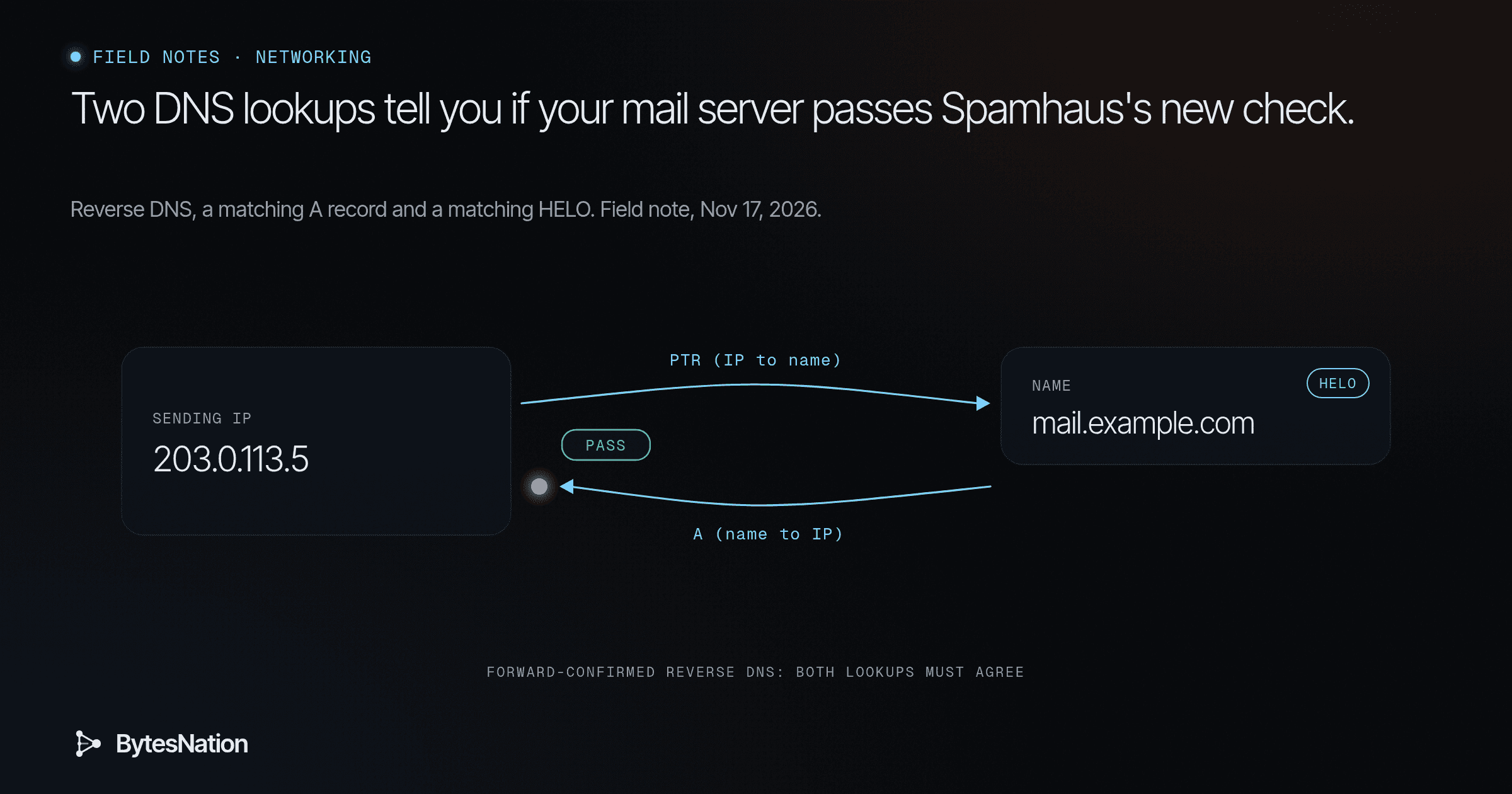
203.0.113.5points back tomail.example.com. Whoever owns the IP block sets it. That’s your ISP or cloud host, not your domain registrar. - FCrDNS, forward-confirmed reverse DNS, means you look up the IP’s name, then look up that name, and you land on the same IP. Both directions agree.
- HELO (or EHLO) is the hostname your server announces when it opens a connection to another mail server.
Think of caller ID. A number calls you. You look it up and it says “Joe’s Plumbing.” You look up Joe’s Plumbing and it lists that same number. If any link breaks, you don’t pick up.
Why receivers care, and what it does not prove
A hijacked home PC or a throwaway cloud box usually has no reverse name, or a generic one the provider assigned. A real mail server has an operator who set the name on purpose. So the check is a cheap filter for “nobody is minding this IP.”
It is not a trust score. A spammer who runs their own server can set up FCrDNS too, and some commenters in the Hacker News thread called HELO checks toil that won’t stop spam. That’s a fair point. Passing the check gets you past the door. It doesn’t make your mail welcome.
The first step
Find your real sending IP first. Open a message you sent, view the full headers, and read the Received lines. Don’t guess. The IP your mail leaves from is often a relay or a NATA technique that translates private IP addresses to a public IP address so multiple devices on a local network can share a single internet connection. Read more → address, not the box you think.
Then run this, swapping in your IP and the name it returns:
dig +short -x 203.0.113.5        # reverse: IP to name
dig +short A mail.example.com    # forward: that name back to an IP. Must match.
If the second line prints the IP you started with, you pass FCrDNS. If you have IPv6Version 6 of the Internet Protocol, with 128-bit addresses written in hex, like 2001:db8::1. Read more → sending, repeat it with AAAA. Mail servers prefer IPv6 when both sides have it, and that is where people forget to set a PTR.
What each failure means, and who fixes it
No PTR at all. Stop here. You can’t fix this from your domain’s DNS. Only the IP owner can set it. On a VPS, look for a “reverse DNS” field in the provider panel or open a ticket. On a home connection, most ISPs won’t set one and many block outbound portA numbered endpoint on a device that identifies a specific application or service, allowing multiple network services to run on the same IP address. Read more → 25 anyway. That is the honest reason “self-host mail from home” keeps failing. The fix is to send through a relay, also called a smarthost, whose IPs already pass. Fighting the ISP rarely works.
PTR exists, but the forward lookup gives a different IP or nothing. This one is yours. Add or fix the A record, and AAAA if needed, for that hostname in your own DNS.
Both match, but you still get flagged. Check the HELO. Spamhaus says the HELO name must resolve to the sending IP and stay the same across connections. It also says not to use localhost or a generic hostname that points to your ISP or host. In Postfix, the HELO comes from smtp_helo_name, which defaults to myhostname. A bare domain like example.com that points at your website instead of your mail server is a common miss.
Here is a good lesson in reading advice. In that same HN thread, one commenter suggested using your ISP’s assigned PTR name, the cust-12345.isp.com kind, as your HELO. The Spamhaus page says the opposite. When advice conflicts, go to the source that’s doing the enforcing.
All three pass. Now look at SPF, DKIM and DMARC. Spamhaus lists them as minimum requirements too, and says not to stay at DMARC p=none forever.
What we saw on our box
The box has no dig, and its plain DNS traffic gets filtered, so the script asks Cloudflare’s DNS-over-HTTPS service instead. If dig gives odd answers on a locked-down network, suspect the resolver before the record.
Results from the run:
- Google’s inbound mail host
gmail-smtp-in.l.google.comat 192.178.155.27 reverses toyuiadrs-in-f27.1e100.net, which resolves back to 192.178.155.27. Pass. - The box’s own public IP, a typical cloud egress address, has no PTR. Outbound port 25 also timed out.
That pair is the whole lesson. A box like ours could run a perfect Postfix config and its mail would still get junked, because the first link in the chain belongs to someone else. The right move for a box like that is a relay, not more config.
Your build for tonight
Pick one machine you own that sends mail, even if it’s only alerts. Find its real sending IP from a header, run the two lookups, and write down which of the four cases you hit. If it’s case one, set up your NAS or server to send through a relay you already have an account with. If it’s case two or three, it’s a ten-minute DNS or config fix.
New to DNS? BNLC Phase 5: Networking Fundamentals covers names, addresses and lookups from zero.
Go deeper: the script, HELO checks, IPv6 and DMARC
The test script. src/fcrdns_doh.py in this note’s folder uses only the Python standard library. It queries https://cloudflare-dns.com/dns-query with accept: application/dns-json, pulls MX, SPF and DMARC for a domain, then runs PTR then A for an IP and compares. Raw output with our box IP omitted:
== FCrDNS for gmail-smtp-in.l.google.com 192.178.155.27
  PTR: ['yuiadrs-in-f27.1e100.net.']
  PTR->A: ['192.178.155.27']
  RESULT: PASS
== FCrDNS for this box's public IP
  PTR: NONE
  RESULT: FAIL (no PTR)
== outbound port 25: TimeoutError timed out
== FCrDNS for aspmx.l.google.com 142.251.167.26
  PTR: ['ww-in-f26.1e100.net.']
  PTR->A: ['142.251.167.26']
  RESULT: PASS
Check what your server really announces. Spamhaus has a HELO/DNS checker on its Sender Guidelines page, and the page says you can also send a message to helocheck@abuseat.org to see the HELO in use. In Postfix, postconf smtp_helo_name myhostname shows both values.
IPv6. Spamhaus requires IPv6 sending to come from a /64 or larger allocation with valid reverse DNS. Each sending address needs its own PTR.
SPF, DKIM and DMARC. Spamhaus asks for DKIM aligned with the domain in your visible From address and an SPF record that stays within the 10 DNS lookup limit. To see a domain’s DMARC policy, run dig +short TXT _dmarc.example.com. If it says p=none, the usual path is to read the aggregate reports first, then move to quarantine once legitimate senders all pass.
Scripts
src/fcrdns_doh.py
import json, urllib.request, ipaddress, socket
def q(n,t):
    req=urllib.request.Request(f"https://cloudflare-dns.com/dns-query?name={n}&type={t}",headers={"accept":"application/dns-json"})
    d=json.load(urllib.request.urlopen(req,timeout=8))
    return [a["data"] for a in d.get("Answer",[]) if a["type"]=={"A":1,"MX":15,"TXT":16,"PTR":12}[t]]
def fcrdns(ip):
    rev=ipaddress.ip_address(ip).reverse_pointer
    ptr=q(rev,"PTR"); print("  PTR:",ptr or "NONE")
    if not ptr: print("  RESULT: FAIL (no PTR)"); return
    back=q(ptr[0].rstrip("."),"A"); print("  PTR->A:",back)
    print("  RESULT:","PASS" if ip in back else "FAIL (mismatch)")
for d in ["gmail.com","bytesnation.com"]:
    print("==",d); print(" MX:",q(d,"MX"))
    print(" SPF:",[t for t in q(d,"TXT") if "spf1" in t.lower()])
    print(" DMARC:",q("_dmarc."+d,"TXT"))
mx=sorted(q("gmail.com","MX"),key=lambda s:int(s.split()[0]))[0].split()[1].rstrip(".")
ip=q(mx,"A")[0]; print("== FCrDNS for",mx,ip); fcrdns(ip)
myip=urllib.request.urlopen("https://api.ipify.org",timeout=8).read().decode(); import builtins; MYIP=myip
print("== FCrDNS for this box's public IP (a typical cloud/residential-style egress)"); fcrdns(myip)
s=socket.socket(); s.settimeout(8)
try: s.connect((ip,25)); print("== SMTP banner:",s.recv(200).decode().strip())
except Exception as e: print("== outbound port 25:",type(e).__name__,e)
# bytesnation.com's own MX host (Google Workspace)
mx2=sorted(q("bytesnation.com","MX"),key=lambda s:int(s.split()[0]))[0].split()[1].rstrip(".")
ip2=q(mx2,"A")[0]; print("== FCrDNS for",mx2,ip2); fcrdns(ip2)
src/run-raw.txt
== gmail.com
 MX: ['30 alt3.gmail-smtp-in.l.google.com.', '40 alt4.gmail-smtp-in.l.google.com.', '5 gmail-smtp-in.l.google.com.', '20 alt2.gmail-smtp-in.l.google.com.', '10 alt1.gmail-smtp-in.l.google.com.']
 SPF: ['"v=spf1 redirect=_spf.google.com"']
 DMARC: ['"v=DMARC1; p=none; sp=quarantine; rua=mailto:mailauth-reports@google.com"']
== bytesnation.com
 MX: ['1 aspmx.l.google.com.', '5 alt1.aspmx.l.google.com.', '5 alt2.aspmx.l.google.com.', '10 alt3.aspmx.l.google.com.', '10 alt4.aspmx.l.google.com.']
 SPF: ['"v=spf1 include:_spf.google.com ~all"']
 DMARC: ['"v=DMARC1; p=none; sp=none; adkim=r; aspf=r; fo=1; rua=mailto:954955e7c9dc45f693516bdd053a62a4@dmarc-reports.cloudflare.net"']
== FCrDNS for gmail-smtp-in.l.google.com 192.178.155.27
  PTR: ['yuiadrs-in-f27.1e100.net.']
  PTR->A: ['192.178.155.27']
  RESULT: PASS
== FCrDNS for this box's public IP (a typical cloud/residential-style egress)
  PTR: NONE
  RESULT: FAIL (no PTR)
== outbound port 25: TimeoutError timed out
== FCrDNS for aspmx.l.google.com 142.251.167.26
  PTR: ['ww-in-f26.1e100.net.']
  PTR->A: ['142.251.167.26']
  RESULT: PASS