A field note for anyone running a self-hosted app on Postgres. Every number below comes from a test we ran on PostgreSQL 19.0 on our build box this morning. The scripts are in Go deeper.
The short version
If you self-host photos, files, a gitA distributed version control system that tracks changes to files over time, enabling collaboration, branching, and complete history of every modification. Read more → server or an SSOAn authentication scheme that lets users log in once and gain access to multiple independent systems without re-entering credentials for each one. Read more → provider, there’s a good chance a Postgres database sits underneath it. Immich, Nextcloud, Forgejo, Paperless-ngx and Authentik all support it. Sooner or later you delete a pile of old data, check your disk, and nothing changed.
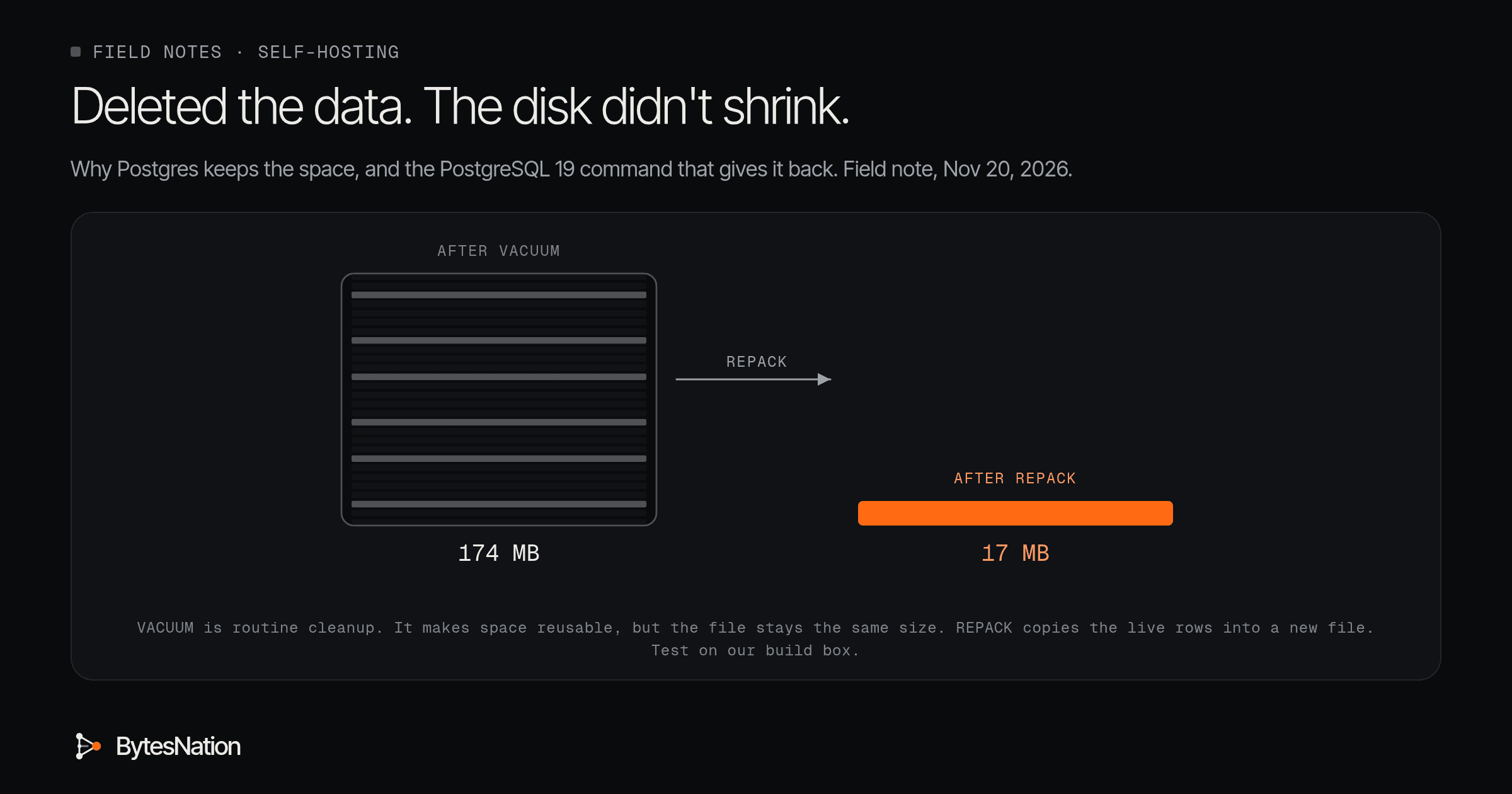
That isn’t a bug. In our test, a table with 90% of its rows deleted stayed at 174 MB after Postgres ran its normal cleanup. After the new REPACK command it was 17 MB.
PostgreSQL 19 came out on Nov 19, and REPACK is the feature most homelabs will actually use. We also hit a catch. Even the “doesn’t block your app” version of it will stall if one forgotten session is holding a transaction open on that table.
Your first step: before touching anything, check whether you even have a bloat problem. The query is below, and it’s read-only.
Why deleting rows doesn’t free disk
A few terms first.
- A row is one record in a table.
- A dead row is one you deleted or replaced with an update. It’s gone from your queries but still physically in the file.
- VACUUM is Postgres’s routine cleanup. Autovacuum runs it for you in the background.
- Bloat is space inside a table file that holds no live data.
Think of a notebook where you cross lines out instead of erasing them. VACUUM goes through and notes “lines 3 to 40 are free to write over.” New rows will reuse that space, so the table stops growing. But the notebook is just as thick as before. The only way to make it thinner is to copy the lines you still need into a new notebook and throw the old one away.
That copy is what REPACK does. The REPACK docs put it plainly: unlike VACUUM, it rewrites the table “into a new disk file with no extra space,” so the unused space goes back to the operating systemThe core software that manages a computer's hardware and gives every other program a safe, shared way to use the CPU, memory, storage, and network. Read more →. It rebuilds the indexes too.
Postgres has always had a way to do this. VACUUM FULL rewrites the table, but it locks everyone out, readers included, until it finishes. The release notes say REPACK replaces VACUUM FULL and CLUSTER, which both stay for compatibility. The new part is REPACK (CONCURRENTLY), which “allows repacking without blocking reads and writes to the table.” The outside tool pg_repack has offered online rebuilds for years. Now it’s built in.
Check before you change anything
This works on any Postgres version. Connect with psql to your app’s database and run:
SELECT relname, n_live_tup, n_dead_tup,
       pg_size_pretty(pg_total_relation_size(relid)) AS total_size
FROM pg_stat_user_tables
ORDER BY pg_total_relation_size(relid) DESC LIMIT 10;
Read it like an operator would. A big table with lots of dead rows is the obvious hint. But look at our test table: after VACUUM it showed 100,000 live rows, zero dead rows, and still weighed 195 MB. VACUUM had already cleaned up the dead rows, so the counter looked healthy while the file stayed huge. A small live count next to a big size is the real tell.
For an exact number, the pgstattuple extension reads the table page by page. On a table shaped like our test, it reported 9.57% live data and 87.93% free space before REPACK, and 95.69% live with 1.62% free after.
What we saw when we ran it
We ran PostgreSQL 19.0 from the official apt.postgresql.org packages, as a normal user on a local socket, on an 8 vCPU VMA software-based emulation of a complete computer that runs its own operating system and applications, isolated from the host hardware. Read more → with SSDSolid-State Drive: storage that keeps data on flash memory chips with no moving parts, making it far faster and more durable than a spinning hard drive. Read more → storage. One run of each test, on synthetic tables, so treat the times as illustrative.
| Step | Total size | Table data |
|---|---|---|
| 1M rows inserted | 195 MB | 174 MB |
| 90% deleted, then VACUUM | 195 MB | 174 MB |
| After REPACK | 20 MB | 17 MB |
REPACK took 161 ms on that table. Then we tried the two things that tell you how it behaves in real life.
Live writes. On a 563 MB table with half its rows deleted, we ran REPACK (CONCURRENTLY) while another session kept inserting rows. It finished in about 1.8 seconds. All 40 of 40 insert batches succeeded, all 40,000 new rows were there afterward, and the table ended at 283 MB.
One open transaction. We left a second session sitting in an open transaction that had read the table, then ran REPACK with a 2 second lock timeout. Plain REPACK failed. So did REPACK (CONCURRENTLY), with the same error:
ERROR:  canceling statement due to lock timeout
CONTEXT:  waiting for AccessExclusiveLock on relation 16385 of database 5
That’s the lesson worth keeping. The docs explain that CONCURRENTLY does the bulk of the copy under a light lock, replays the changes made meanwhile, and then takes the full exclusive lock “only during the final phase to swapDisk space the operating system uses as overflow when physical memory (RAM) fills up, at the cost of being much slower than RAM. Read more → the table and index files.” Short, but not zero. If anything is holding the table, it waits. And while it waits for that lock, Postgres queues the requests that arrive behind it, so a REPACK with no timeout can stall your app.

Troubleshooting it like an operator
- “I deleted rows and the disk didn’t shrink.” Expected. VACUUM makes space reusable, it doesn’t return it. Run the check above first.
- “REPACK (CONCURRENTLY) just hangs.” Something has a transaction open. Look in
pg_stat_activityfor sessions inidle in transaction. Setlock_timeoutbefore you start so it fails fast instead of piling up queries behind it. - “It ran out of disk.” REPACK builds a full copy first. The docs say you need free space at least equal to the table plus its indexes.
- “I’m on Postgres 16 or 17.” No REPACK.
VACUUM FULLdoes the same rewrite but blocks the table the whole time, so stop the app and do it in a maintenance window. - “Should I REPACK on a schedule?” Usually no. Autovacuum keeps a steady table healthy. REPACK is for after a big one-off delete or a long-neglected table.
One warning before anyone goes looking for REPACK: don’t upgrade by changing your DockerA platform that packages applications into containers, providing a standardized way to build, ship, and run software consistently across any environment. Read more → image tag from 17 to 19. The release notes say moving data between major versions needs a dump and restore with pg_dumpall, pg_upgrade, or logical replication. Try REPACK first in a throwaway containerA lightweight, portable package that bundles an application with its dependencies and runs in an isolated process on the host OS, sharing the kernel. Read more → like docker run -d -e POSTGRES_PASSWORD=test postgres:19, not on your photo library.
The build for this weekend: run the check query against one database you already self-host, find your biggest table, and see how much of it is actually live.
Go deeper: the lock details, the tail-delete surprise and our test scripts
Why VACUUM sometimes does shrink a table. VACUUM can cut empty pages off the very end of the file. In a second test we deleted the last 900,000 of 1M rows instead of nine out of every ten. Plain VACUUM trimmed the table data to 17 MB, but the total stayed at 38 MB because the primary key index didn’t shrink. Deletes scattered through the table leave gaps VACUUM can’t trim, and indexes bloat too.
Lock levels. Without CONCURRENTLY, REPACK holds ACCESS EXCLUSIVE, which blocks everything, reads included. With it, the copy runs under SHARE UPDATE EXCLUSIVE, which lets normal reads and writes continue. Changes made during the copy are captured with logical decoding and applied before the final swap. The docs say the command fails if more than about 104 million rows are updated or deleted while it runs.
Not MVCC-safe. The docs warn that after a concurrent REPACK commits, a transaction using a snapshot taken before it started will see the table as empty. Long-running reports and backup jobs that hold an old snapshot are the ones to watch.
Other limits from the docs. REPACK counts as one long-running transaction for wraparound purposes, so on a huge table it can stop VACUUM from cleaning other tables. It isn’t a wraparound fix, so use VACUUM for that. It refuses tables with an invalid index. REPACK ... USING INDEX reorders rows by an index, which is what CLUSTER used to do.
Watching progress. The new view pg_stat_progress_repack reports progress for REPACK, CLUSTER and VACUUM FULL.
Getting an exact bloat number.
CREATE EXTENSION IF NOT EXISTS pgstattuple;
SELECT * FROM pgstattuple('your_table');
Read free_percent. Note that this scans the whole table.
Our test. PostgreSQL 19.0, Debian build 19.0-1.pgdg13+1, from apt.postgresql.org, packages checked against the repo’s SHA256 index, extracted to a scratch folder and run as a normal user on a Unix socket with no network listener, Fri Nov 20, 2026, about 5:35 AM ET. REPACK (CONCURRENTLY) ran at the default wal_level = replica. The scripts are test.sql and test2.sql, and the raw output is in results.txt, results2.txt, results3.txt and results4.txt. All of them are published next to this note. The server and its data were deleted afterward.
Scripts
src/test.sql
\timing on
DROP TABLE IF EXISTS events;
CREATE TABLE events (id bigserial PRIMARY KEY, created timestamptz DEFAULT now(), payload text);
INSERT INTO events (payload) SELECT repeat(md5(g::text), 4) FROM generate_series(1, 1000000) g;
SELECT 'after insert' AS step, pg_size_pretty(pg_total_relation_size('events')) total, pg_size_pretty(pg_relation_size('events')) heap, count(*) rows FROM events;
DELETE FROM events WHERE id % 10 <> 0;
VACUUM events;
SELECT 'after delete 90% + VACUUM' AS step, pg_size_pretty(pg_total_relation_size('events')) total, pg_size_pretty(pg_relation_size('events')) heap, count(*) rows FROM events;
SELECT relname, n_live_tup, n_dead_tup, last_vacuum IS NOT NULL AS vacuumed FROM pg_stat_user_tables WHERE relname='events';
REPACK (VERBOSE) events;
SELECT 'after REPACK' AS step, pg_size_pretty(pg_total_relation_size('events')) total, pg_size_pretty(pg_relation_size('events')) heap, count(*) rows FROM events;
SHOW wal_level;
REPACK (CONCURRENTLY) events;
src/test2.sql
DROP TABLE IF EXISTS tailtest;
CREATE TABLE tailtest (id bigserial PRIMARY KEY, payload text);
INSERT INTO tailtest (payload) SELECT repeat(md5(g::text), 4) FROM generate_series(1, 1000000) g;
DELETE FROM tailtest WHERE id > 100000;
VACUUM tailtest;
SELECT 'tail delete 90% + VACUUM' AS step, pg_size_pretty(pg_total_relation_size('tailtest')) total, pg_size_pretty(pg_relation_size('tailtest')) heap;
src/results.txt
Timing is on.
psql:test.sql:2: NOTICE:  table "events" does not exist, skipping
DROP TABLE
Time: 0.711 ms
CREATE TABLE
Time: 4.176 ms
INSERT 0 1000000
Time: 3226.220 ms (00:03.226)
     step     | total  |  heap  |  rows
--------------+--------+--------+---------
 after insert | 195 MB | 174 MB | 1000000
(1 row)

Time: 80.874 ms
DELETE 900000
Time: 477.013 ms
VACUUM
Time: 159.810 ms
           step            | total  |  heap  |  rows
---------------------------+--------+--------+--------
 after delete 90% + VACUUM | 195 MB | 174 MB | 100000
(1 row)

Time: 22.001 ms
 relname | n_live_tup | n_dead_tup | vacuumed
---------+------------+------------+----------
 events  |     100000 |          0 | t
(1 row)

Time: 2.548 ms
psql:test.sql:10: INFO:  repacking "public.events" in physical order
psql:test.sql:10: INFO:  "public.events": found 0 removable, 100000 nonremovable row versions in 22223 pages
DETAIL:  0 dead row versions cannot be removed yet.
CPU: user: 0.02 s, system: 0.05 s, elapsed: 0.09 s.
REPACK
Time: 161.492 ms
     step     | total | heap  |  rows
--------------+-------+-------+--------
 after REPACK | 20 MB | 17 MB | 100000
(1 row)

Time: 4.496 ms
 wal_level
-----------
 replica
(1 row)

Time: 0.342 ms
REPACK
Time: 142.465 ms
src/results2.txt
psql:test2.sql:1: NOTICE:  table "tailtest" does not exist, skipping
DROP TABLE
CREATE TABLE
INSERT 0 1000000
DELETE 900000
VACUUM
           step           | total | heap
--------------------------+-------+-------
 tail delete 90% + VACUUM | 38 MB | 17 MB
(1 row)

== lock test
SET
ERROR:  canceling statement due to lock timeout
CONTEXT:  waiting for AccessExclusiveLock on relation 16385 of database 5
SET
Timing is on.
ERROR:  canceling statement due to lock timeout
CONTEXT:  waiting for AccessExclusiveLock on relation 16385 of database 5
Time: 2142.607 ms (00:02.143)
src/results3.txt
== concurrent writes during REPACK (CONCURRENTLY), 3M rows, half deleted
before: rows=1500000 total=563 MB
Timing is on.
INFO:  repacking "public.busy" in physical order
INFO:  "public.busy": found 0 removable, 1504000 nonremovable row versions in 63830 pages
DETAIL:  0 dead row versions cannot be removed yet.
CPU: user: 0.50 s, system: 0.44 s, elapsed: 1.19 s.
REPACK
Time: 1828.165 ms (00:01.828)
writer: 40 of 40 insert batches succeeded
after: rows=1540000 writer_rows=40000 total=283 MB
src/results4.txt
     step      |  size  | live_pct | dead_pct | free_percent
---------------+--------+----------+----------+--------------
 before REPACK | 160 MB |     9.57 |        0 |        87.93
(1 row)

REPACK
     step     | size  | live_pct | dead_pct | free_percent
--------------+-------+----------+----------+--------------
 after REPACK | 16 MB |    95.69 |        0 |         1.62
(1 row)