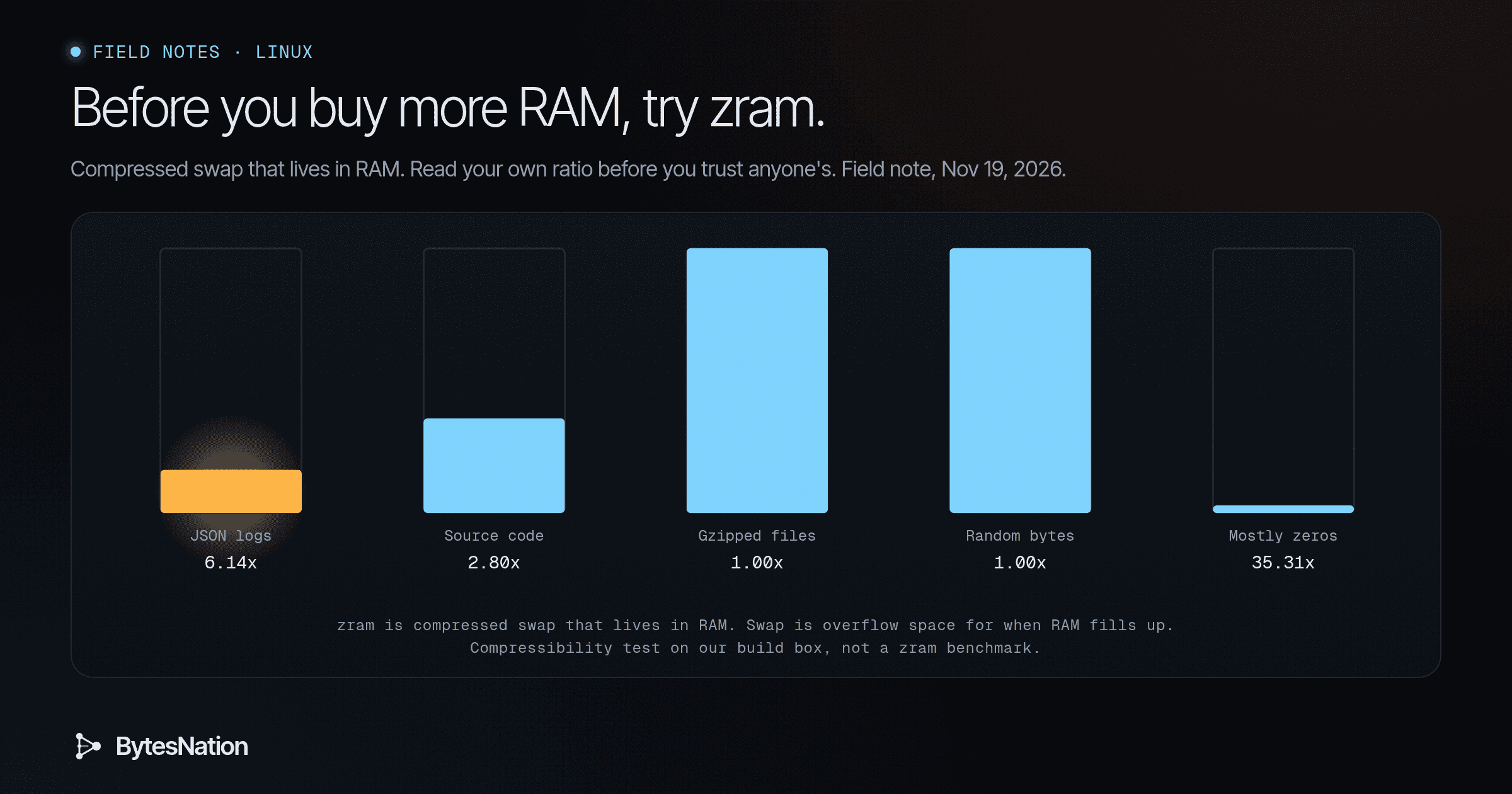
A field note on compressed swapDisk space the operating system uses as overflow when physical memory (RAM) fills up, at the cost of being much slower than RAM. Read more → for Linux desktops, mini PCs and homelab VMs. We could not load zram on our build box, so the ratios below come from a page-by-page compression test we ran, not from a live zram device. The script is in Go deeper.
The short version
A postPower-On Self-Test: the quick hardware check firmware runs every time a computer starts, before it looks for an operating system. Read more → called Do not buy RAM, compress! is making the rounds today. The advice is good. Memory is expensive, a lot of laptops and mini PCs can’t be upgraded, and many Linux installs ship without memory compression. The author fit 5.7G of data into 1.7G of RAM, a 1:3.35 ratio, and says ratios up to 1:4 are not uncommon.
Here is the part worth slowing down for. That ratio belongs to that machine and that workload. When we compressed different kinds of data the way zram does, the same compressor gave us 6.1x on log text and exactly 1.0x on random or already zipped data. Your number depends on what is sitting in your memory, and Linux will tell you that number in one command.
Your first step: run zramctl. Empty output means you don’t have zram yet.
What zram actually is
A few terms first.
- RAM is the fast working memory your programs live in.
- Swap is overflow space. When RAM fills up, Linux moves idle chunks of memory out to swap so active programs have room. Classic swap lives on your disk, which is far slower than RAM.
- A page is the small chunk Linux moves around, usually 4 KiB.
- zram is a kernelThe core of an operating system that runs with full hardware control and decides how every program gets CPU time, memory, and device access. Read more → feature that makes a block device out of RAM. In the kernel’s words, “pages written to these disks are compressed and stored in memory itself.” Use it as swap, and overflow gets squeezed and kept in RAM instead of written to disk.
Think of a packed closet. You can vacuum-seal the winter coats you aren’t wearing and fit two or three times as much on the shelf. Sealing and unsealing takes a little effort each time, which is CPU work. And it does nothing for things that are already flat, like a stack of books. In memory, the flat things are photos, video, encrypted data and anything already compressed.
zram does not compress everything in RAM. It only holds what Linux decided to swap out, which is idle memory under pressure. If your box never fills its RAM, zram sits nearly empty and costs almost nothing. Fedora’s change notes put the cost of an unused device at about 0.1% overhead.
Why the ratio is the whole story
The question to ask is not “does zram work?” It’s “how well does my memory compress?” An experienced operator measures that before deciding anything else.
To get a feel for it, we took five kinds of data and compressed them one 4 KiB page at a time with lz4 and zstd, two of the compressors zram supports. A page that didn’t shrink was counted at full size, since zram keeps those pages uncompressed. Results from our build box, Thu Nov 19, 2026, 7:22 AM ET:
| Data | lz4 | zstd |
|---|---|---|
| JSONA lightweight, human-readable data format used to exchange structured information between systems, based on JavaScript object syntax. Read more → log lines | 3.82x | 6.14x |
| Source code | 1.96x | 2.80x |
| Gzipped source code | 1.00x | 1.00x |
| Random bytes | 1.00x | 1.00x |
| Pages that are mostly zeros | 34.71x | 35.31x |
Three lessons fall out of that table.
- Text compresses well. Browser tabs, logs, JSON and code are full of repeats.
- Already compressed data gains nothing. If your memory is mostly video buffers, encrypted data or model weights, zram will hold it at about 1:1 and spend CPU for no gain. Someone on the Hacker News thread asked exactly this about local AI models, and the reasoning holds: weights behave like a JPEG inside a zip file.
- zstd squeezes harder, lz4 runs faster. On text, zstd got about 1.5x more out of each page. In our test it also ran at about half of lz4’s speed. On a strong desktop CPU that rarely matters. On a Raspberry Pi class board it can.
This is not a zram benchmark. Python adds overhead, so the speeds only compare the two compressors to each other. What it shows is the shape: the kind of data matters more than the tool.
Turn it on
Check first. Fedora has shipped swap on zram by default since Fedora 33, so you may already have it.
zramctl
swapon --show
If both show nothing about zram, the simplest path on most systemdThe init system and service manager for most modern Linux distributions, responsible for booting the system and managing running services. Read more → distros is zram-generator. On Debian and Ubuntu the package is systemd-zram-generator. Install it, then give it a one-line config, which is the method the Arch Wiki documents:
# /etc/systemd/zram-generator.conf
[zram0]
Reboot, or run sudo systemctl daemon-reload and sudo systemctl start systemd-zram-setup@zram0.service. Run zramctl again and you should see /dev/zram0 with [SWAP] next to it.
With that empty section you get the defaults. The zram-generator docs list the size as min(ram / 2, 4096) MB and the swap priority as 100, so zram gets used before any disk swap. Size here means how much uncompressed data the device will accept, not how much RAM it takes. Undoing it is just as easy: delete the file and reboot.
Read your own number
Don’t check right after boot. zram only fills when memory gets tight. Get through a normal heavy day with your usual tabs, containers and editor open, then run zramctl. The Arch Wiki explains the columns:
- DATA is how much uncompressed memory zram is holding.
- COMPR is what that compressed down to.
- TOTAL is the real RAM used, including zram’s own bookkeeping.
Your honest ratio is DATA divided by TOTAL. Use TOTAL, not COMPR, because TOTAL is what you actually paid in RAM. If DATA is 1.9G and TOTAL is 425M, you are getting about 4.5x, and zram is earning its keep.

When it doesn’t seem to help
Work through it the way you would any performance problem. Confirm it’s in use. Then look at what it’s holding. Then look at what it costs.
- “Nothing changed.” Check DATA in
zramctl. If it’s near zero, your box isn’t under memory pressure, and zram has nothing to do. That’s fine. - “My ratio is bad.” Look at what’s using memory. Media, encrypted volumes and model weights won’t shrink. That’s the data, not a broken setup.
- “Things got laggy when memory filled.” Every page in and out costs CPU. Try lz4 instead of zstd, or a smaller device.
- “I have zram and disk swap.” Run
swapon --showand check PRIO. zram should have the higher number so it’s used first. - “Memory keeps growing no matter what.” zram buys headroom. It doesn’t fix a program that leaks memory. Find the process with
toporhtopsorted by memory.
If you want the reasons a CPU can look busy while it’s really waiting on memory, our earlier field note Your CPU Says 100%. It Might Be Waiting on RAM the Whole Time pairs well with this one.
Pick the Linux box that runs out of memory most often, turn on zram tonight, and check zramctl after a full day of use. One real ratio from your own machine beats any number on the internet, including ours.
Go deeper: zswap, the raw counters, tuning and our test script
zram or zswap, not both. zswap is a compressed cache that sits in front of a disk swap device. zram is the swap device itself. zram suits machines with no swap partitionA defined section of a physical disk that the operating system treats as a separate unit, each usually holding its own filesystem. Read more → or slow storage, like mini PCs, single-board computers and small VMs. The Arch Wiki warns that if zswap stays enabled it “will prevent zram from being used effectively,” and recommends disabling it first. Check with cat /sys/module/zswap/parameters/enabled.
The raw counters. zramctl reads from /sys/block/zram0/mm_stat. The kernel docs define the first three fields as orig_data_size, compr_data_size and mem_used_total, where mem_used_total includes “allocator fragmentation and metadata overhead.” So the honest ratio is field 1 divided by field 3. The same file also counts huge_pages, the incompressible ones.
Tuning. The Arch Wiki lists the sysctl values Pop!_OS uses with zram: vm.swappiness = 180, vm.watermark_boost_factor = 0, vm.watermark_scale_factor = 125 and vm.page-cluster = 0. The kernel’s own guidance, quoted on the same page, says values above 100 make sense for in-memory swap like zram. Check what your distro already sets before changing anything.
Writeback and recompression. With CONFIG_ZRAM_WRITEBACK, zram can push idle or incompressible pages to a backing disk partition. With CONFIG_ZRAM_MULTI_COMP, it can recompress cold pages with a stronger secondary algorithm. zram-generator exposes both through writeback-device and a second entry in compression-algorithm.
Hibernation. The Arch Wiki notes that hibernating to swap on zram is not supported. Keep a disk swap partition if you hibernate.
Our test. pagetest.py builds five samples (JSON log lines, Python standard library source, a gzip of that source, random bytes, and pages that are mostly zeros), splits each into 4 KiB pages and compresses each page on its own with lz4 and zstd level 1. Pages that don’t shrink count at 4096 bytes. Run on our build box (8-core Intel Xeon VM, Python 3.13.5, lz4 4.4.5, zstandard 0.25.0), Thu Nov 19, 2026, 7:22 AM ET. The box kernel has no zram module, so this measures compressibility, not zram itself. Speeds are Python speeds on one core and only useful for comparing the two compressors.
sample           algo     pages   ratio  MiB/s
json_logs        lz4       2963   3.82x    919
json_logs        zstd-1    2963   6.14x    391
source_code      lz4       1110   1.96x    509
source_code      zstd-1    1110   2.80x    249
already_gzipped  lz4        273   1.00x   2528
already_gzipped  zstd-1     273   1.00x   1264
random_bytes     lz4      16384   1.00x   2471
random_bytes     zstd-1   16384   1.00x   1190
mostly_zeros     lz4      16384  34.71x   2903
mostly_zeros     zstd-1   16384  35.31x   1961
To run it yourself: python3 -m venv v && v/bin/pip install lz4 zstandard && v/bin/python pagetest.py. Real zram also stores pages that are all one repeated value specially, without compressing them, so a live device can beat the mostly-zeros row.
Scripts
src/pagetest.py
# Compress sample data in 4 KiB pages, one page at a time, the way zram stores pages.
# A page that does not shrink is counted at full size (zram keeps it uncompressed).
# Not a zram test: it shows how much the *kind* of data changes the ratio.
import gzip, json, os, random, sysconfig, glob, time
import lz4.block, zstandard

P = 4096
random.seed(42)

def json_logs(n=120000):
    lvls = ["INFO", "WARN", "ERROR", "DEBUG"]
    paths = ["/api/login", "/api/items", "/health", "/api/cart", "/static/app.js"]
    return "\n".join(json.dumps({"ts": 1763550000 + i, "level": random.choice(lvls),
        "path": random.choice(paths), "status": random.choice([200, 200, 200, 404, 500]),
        "ms": random.randint(1, 900), "user": f"u{random.randint(1, 5000)}"}) for i in range(n)).encode()

def source_text(limit=16 * 2**20):
    out = b""
    for f in sorted(glob.glob(os.path.join(sysconfig.get_paths()["stdlib"], "*.py"))):
        out += open(f, "rb").read()
        if len(out) > limit: break
    return out

src = source_text()
samples = {
    "json_logs": json_logs(),
    "source_code": src,
    "already_gzipped": gzip.compress(src, 6),
    "random_bytes": os.urandom(64 * 2**20),
    "mostly_zeros": b"".join((b"\0" * 4000 + os.urandom(96)) for _ in range(16384)),
}
zc = zstandard.ZstdCompressor(level=1)
algos = {"lz4": lambda p: lz4.block.compress(p, store_size=False), "zstd-1": zc.compress}
print(f"{'sample':16s} {'algo':7s} {'pages':>6s} {'ratio':>7s} {'MiB/s':>6s}")
for name, data in samples.items():
    pages = [data[i:i + P] for i in range(0, len(data) - P + 1, P)]
    for a, fn in algos.items():
        t = time.perf_counter(); out = 0
        for p in pages: out += min(len(fn(p)), P)
        dt = time.perf_counter() - t
        print(f"{name:16s} {a:7s} {len(pages):6d} {len(pages)*P/out:6.2f}x {len(pages)*P/2**20/dt:6.0f}")
src/results.txt
Thu Nov 19 2026 7:22 AM EST
sample           algo     pages   ratio  MiB/s
json_logs        lz4       2963   3.82x    919
json_logs        zstd-1    2963   6.14x    391
source_code      lz4       1110   1.96x    509
source_code      zstd-1    1110   2.80x    249
already_gzipped  lz4        273   1.00x   2528
already_gzipped  zstd-1     273   1.00x   1264
random_bytes     lz4      16384   1.00x   2471
random_bytes     zstd-1   16384   1.00x   1190
mostly_zeros     lz4      16384  34.71x   2903
mostly_zeros     zstd-1   16384  35.31x   1961