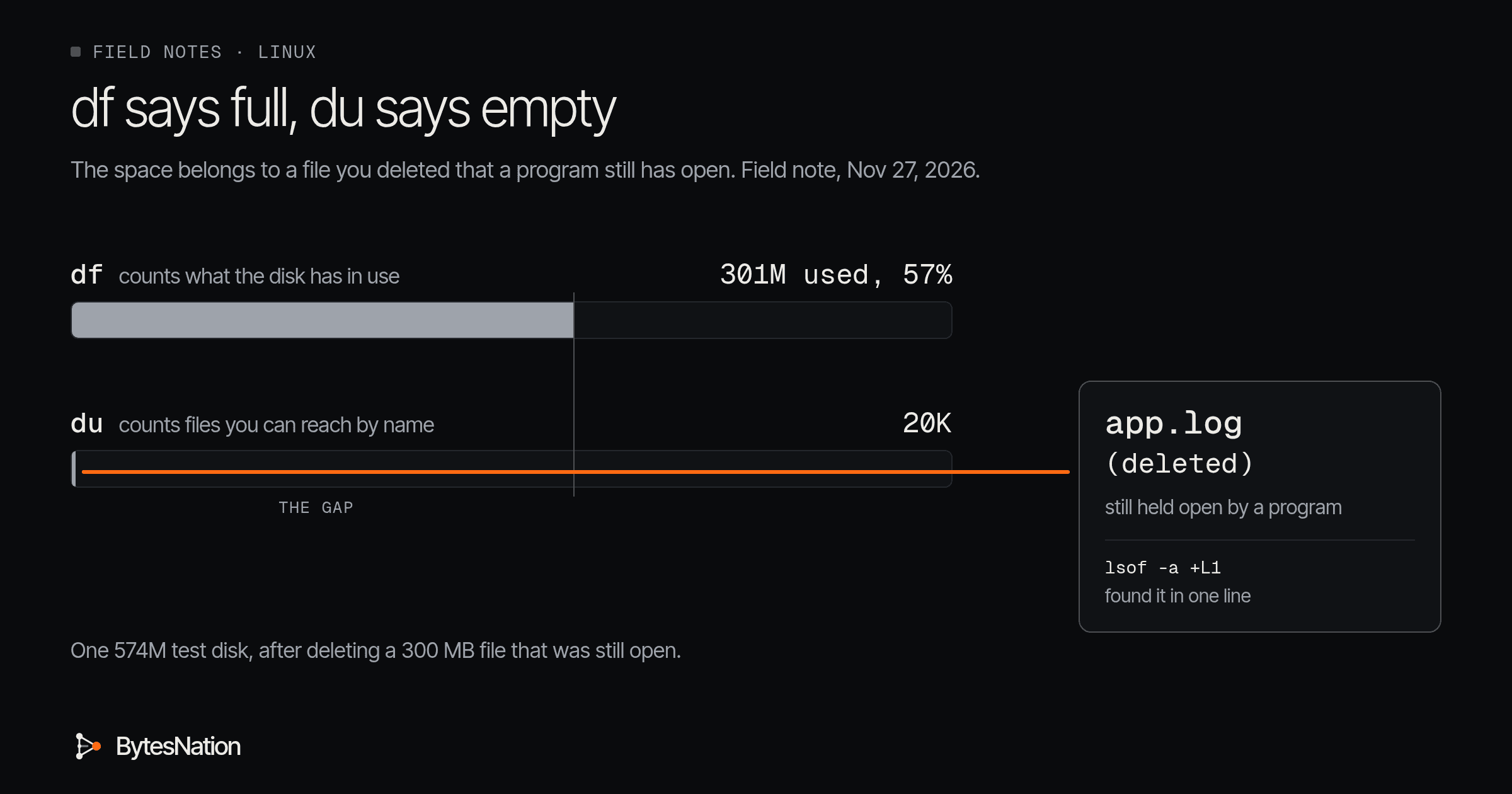
A field note from our build box, Fri Nov 27, 2026. Every number below came from a 600 MB test disk we built, broke and threw away this morning. Nothing here costs money.
The short version
You get the alert: the disk is at 95%. You find a giant log file, delete it, and check again. Still full.
So you open a second tool. df says the disk is full. du says the folders hold almost nothing. One of them looks broken.
Neither is. They count different things, and the gap between them is the clue. df asks the filesystemThe structure an operating system uses to organize data on a disk into files and folders, tracking names, sizes, permissions, and where each piece is stored. Read more → how many blocks are in use. du walks the folders and adds up every file it can reach by name. A file you deleted while a program still had it open has no name anymore, so du can’t see it, but its blocks are still in use, so df still counts them.
Deleting a file removes its name, not its data. The Linux man page for unlink(2) says it plainly: if any process still has the file open, “the file will remain in existence until the last file descriptor referring to it is closed.”
The fix is to find the program holding it and make it let go. One command finds it.
This week that matters more than usual. In “Hard Drive pricing has gotten bad” on his blog, posted Nov 26, 2026, Alex Kretzschmar reports that the same 20TB drive went from $249.99 to $549.99 across two Black Fridays. Before you pay for a bigger drive, make sure the one you have is really full.
The words, in plain terms
- Filename. A label in a folder that points at data on the disk. A file can have more than one label, or none.
- Open file. A program that is reading or writing a file holds a handle to the data, called a file descriptor. The handle points at the data, not the name.
- Deleted but open. You removed the label. The program still holds the handle, so the data stays, and so does the space it uses.
A library makes a fair comparison. Pull a book from the catalog and nobody can look it up anymore, but if someone has it checked out, the shelf space isn’t free until they bring it back.
Here’s the everyday version. A service writes to app.log. Someone deletes the log to free space. The service never noticed and keeps writing to the same handle. The space never comes back, and it keeps growing.
We broke it on purpose
On the build box (Debian 13, kernelThe core of an operating system that runs with full hardware control and decides how every program gets CPU time, memory, and device access. Read more → 6.12.113, coreutils 9.7, lsof 4.99.4) we made a 600 MB ext4 disk image, mounted it, and ran this:
- Empty disk:
dfshowed 172K used,dushowed 20K. - Wrote a 300 MB
app.logand started a small program that held it open. - Deleted
app.log.
After the delete, df said 301M used, 57% full. du said 20K. The folder listing showed only lost+found. That’s the whole puzzle. We had 300 MB in use and no file anywhere to blame.

Find it in the order an operator checks
When two tools disagree, don’t pick the one you like. Ask what each one counts, then go look for the thing one counts and the other can’t see.
- Confirm the gap. Run both tools on the same mount. A small difference is normal. A difference the size of your problem is the clue.
- Look for deleted files that are still open. That’s the most common cause by far, and it’s quick to check.
- Only then look at rarer causes. Files hidden under a mount point, and blocks the filesystem reserves for root. Both are in Go deeper below.
Here’s the starter you can run on any Linux box today:
df -h /  ;  sudo du -shx /
sudo lsof -a +L1 /
+L1 asks lsof for open files with fewer than one link, meaning open files with no name left. -x keeps du on one filesystem so it doesn’t wander into other mounts.
On our test disk, that lsof line returned exactly one entry:
COMMAND    PID USER FD   TYPE DEVICE  SIZE/OFF NLINK NODE NAME
sleep   238565  box 3w   REG    7,0 314572800     0   13 /mnt/dfdu/app.log (deleted)
Read it left to right. The program is sleep, our stand-in for a service. Then come its process ID, file descriptor 3 open for writing, a size of 314,572,800 bytes (our 300 MB), a link count of 0, and the old name marked (deleted). That’s your culprit.
The mistake we made first
Our first try left out -a. It returned 13 lines, not one. Our file was in there, along with 11 other “deleted” entries from the box’s desktop session. They had nothing to do with our disk.
The reason is in the lsof(8) man page: lsof joins its selection options with OR by default, so “open with no links” OR “on this filesystem” matched everything deleted anywhere. -a switches it to AND. We re-ran it with -a and got only our file.
If you run this on a desktop, expect that noise. Small deleted entries owned by desktop programs are normal. You’re looking for a big SIZE/OFF number on the mount that’s full.
Get the space back
There are two ways, and they trade different things.
Restart or stop the program. When the last handle closes, the kernel frees the data. On our test disk, a second 200 MB file held open put df at 201M used. We stopped the program and it dropped back to 172K. This is the clean fix. It costs a moment of downtime, and for a service, systemctl restart is the normal way.
Truncate it through /proc. Every open handle shows up under /proc/<PID>/fd/. Truncating that handle to zero frees the space without a restart. On our disk, sudo truncate -s 0 /proc/238565/fd/3 took df from 301M back to 172K instantly. The catch is that the data in that file is gone, and the program keeps writing to the same handle, so the problem comes back if nothing changes. Use it when you can’t restart and can lose that log.
Rebooting also works, because it closes everything. It’s the last resort, since it also hides which program leaked the space, and that program will do it again.
Stop it from coming back
The usual cause is log rotation that renames or deletes a log without telling the program. logrotate, the tool most Linux distributions use, gives you two honest options: a postrotate script that signals or reloads the program so it reopens its log, or copytruncate, which copies the log and truncates the original in place so the handle stays valid. The man page notes that copytruncate can lose a few lines written between the copy and the truncate. If you found a service holding deleted logs, check how its logs get rotated before you call the fix done.
Your first step
Run the three commands above on one machine that has been running for a while, such as a home server or a Proxmox node. If df and du roughly agree, good, you now know what normal looks like there. If they don’t, lsof -a +L1 will usually tell you why in one line.
Related field notes: Postgres 19 REPACK asks the same “I deleted it, why is it still big?” question inside a database, and zram before you buy RAM is the same habit: measure what you have before you buy more.
Go deeper: the full lab and two more honest df vs du gaps
Run the lab yourself
The script dfdu-lab.sh makes a 600 MB loop image, mounts it at /mnt/dfdu, reproduces all three gaps below, and tears everything down. It touches no real disk. It needs sudoA Linux command that runs a single command with administrator (root) privileges, after checking that your account is allowed to do so. Read more →, e2fsprogs and lsof (sudo apt install lsof on Debian).
src/dfdu-lab.sh
#!/usr/bin/env bash
# df vs du lab: a deleted file that is still open, plus two other honest gaps.
# Runs on a 600 MB loop image. Touches no real disk. Needs sudo, e2fsprogs, lsof.
set -u
export PATH="$PATH:/usr/sbin:/sbin"
IMG=${IMG:-./dfdu.img}; MNT=/mnt/dfdu
truncate -s 600M "$IMG"; mkfs.ext4 -q -F "$IMG"
sudo mkdir -p $MNT; sudo mount -o loop "$IMG" $MNT; sudo chown "$USER" $MNT
echo "== empty"; df -h $MNT | tail -1; sudo du -sh $MNT
head -c 300M /dev/zero > $MNT/app.log
sleep 600 3>>$MNT/app.log &        # a "program" holding app.log open on fd 3
P=$!; sleep 1; rm $MNT/app.log
echo "== after rm, file still open by pid $P"; df -h $MNT | tail -1; sudo du -sh $MNT
echo "== lsof +L1 $MNT (no -a), lines:"; sudo lsof +L1 $MNT 2>/dev/null | wc -l
echo "== lsof -a +L1 $MNT"; sudo lsof -a +L1 $MNT 2>/dev/null
echo "== fix 1: truncate through /proc"; sudo truncate -s 0 /proc/$P/fd/3; df -h $MNT | tail -1
kill $P; wait $P 2>/dev/null
head -c 200M /dev/zero > $MNT/app2.log; sleep 600 3>>$MNT/app2.log & P=$!; sleep 1; rm $MNT/app2.log
echo "== round 2, held open"; df -h $MNT | tail -1
echo "== fix 2: stop the process"; kill $P; wait $P 2>/dev/null; sleep 1; df -h $MNT | tail -1
echo "== reserved blocks"; sudo tune2fs -l "$IMG" | grep -E '^(Block count|Reserved block count|Block size)'
mkdir $MNT/data; head -c 150M /dev/zero > $MNT/data/old.bin
sudo mount -t tmpfs -o size=10M tmpfs $MNT/data
echo "== files hidden under a mount point"; df -h $MNT | tail -1; sudo du -shx $MNT
sudo mkdir -p /mnt/dfdu-bind; sudo mount --bind $MNT /mnt/dfdu-bind; sudo du -sh /mnt/dfdu-bind/data
echo "== teardown"; sudo umount /mnt/dfdu-bind $MNT/data $MNT; sudo rmdir /mnt/dfdu-bind $MNT; rm -f "$IMG"
mount | grep -c dfdu
Our captured output from this morning’s run (the lsof table and teardown lines are left out here; the lsof table is in the main body):
== empty
/dev/loop0      574M  172K  532M   1% /mnt/dfdu
20K	/mnt/dfdu
== after rm, file still open by pid 238565
/dev/loop0      574M  301M  232M  57% /mnt/dfdu
20K	/mnt/dfdu
== lsof +L1 /mnt/dfdu (no -a), lines:
13
== fix 1: truncate through /proc
/dev/loop0      574M  172K  532M   1% /mnt/dfdu
== round 2, held open
/dev/loop0      574M  201M  332M  38% /mnt/dfdu
== fix 2: stop the process
/dev/loop0      574M  172K  532M   1% /mnt/dfdu
== reserved blocks
Block count:              153600
Reserved block count:     7680
Block size:               4096
== files hidden under a mount point
/dev/loop0      574M  151M  382M  29% /mnt/dfdu
20K	/mnt/dfdu
151M	/mnt/dfdu-bind/data
The full run is in run-2026-11-27.txt next to the script.
Files hidden under a mount point
We wrote 150 MB into /mnt/dfdu/data, then mounted another filesystem on top of data. df still counted 151M used. du -x saw 20K, because the old files sit underneath the new mount where no path reaches them. A bind mount of the parent (mount --bind /mnt/dfdu /mnt/dfdu-bind) shows the directory without the mount on top, and there they were: 151M. This happens on real systems when a disk fails to mount at boot, something writes to the empty folder, and the disk mounts over it later.
ext4 reserved blocks
An empty ext4 filesystem doesn’t satisfy Size minus Used equals Avail. On our 574M disk, 172K used left 532M available. tune2fs -l shows why: 7,680 reserved blocks of 4,096 bytes, 30 MiB, 5% of the 153,600 blocks, held back for root so the system can still log and recover when users fill the disk. On a data-only disk, lowering it with tune2fs -m is a common choice. On a root filesystem, leave it.
Containers
A containerA lightweight, portable package that bundles an application with its dependencies and runs in an isolated process on the host OS, sharing the kernel. Read more → that holds a deleted log shows the same symptom on the host. lsof on the host can see those handles too. We didn’t test a container case today, so we’re not printing output for it.
Sources
- unlink(2): https://man7.org/linux/man-pages/man2/unlink.2.html
- lsof(8), for +L and -a: https://man7.org/linux/man-pages/man8/lsof.8.html
- df(1): https://man7.org/linux/man-pages/man1/df.1.html and du(1): https://man7.org/linux/man-pages/man1/du.1.html
- tune2fs(8): https://man7.org/linux/man-pages/man8/tune2fs.8.html
- logrotate(8), copytruncate: https://man7.org/linux/man-pages/man8/logrotate.8.html
src/run-2026-11-27.txt
# run Fri Nov 27 2026 07:29 EST, 6.12.113+, df (GNU coreutils) 9.7, lsof 4.99.4
== empty
/dev/loop0      574M  172K  532M   1% /mnt/dfdu
20K	/mnt/dfdu
== after rm, file still open by pid 238565
/dev/loop0      574M  301M  232M  57% /mnt/dfdu
20K	/mnt/dfdu
== lsof +L1 /mnt/dfdu (no -a), lines:
13
== lsof -a +L1 /mnt/dfdu
COMMAND    PID USER FD   TYPE DEVICE  SIZE/OFF NLINK NODE NAME
sleep   238565  box 3w   REG    7,0 314572800     0   13 /mnt/dfdu/app.log (deleted)
== fix 1: truncate through /proc
/dev/loop0      574M  172K  532M   1% /mnt/dfdu
== round 2, held open
/dev/loop0      574M  201M  332M  38% /mnt/dfdu
== fix 2: stop the process
/dev/loop0      574M  172K  532M   1% /mnt/dfdu
== reserved blocks
Block count:              153600
Reserved block count:     7680
Block size:               4096
== files hidden under a mount point
/dev/loop0      574M  151M  382M  29% /mnt/dfdu
20K	/mnt/dfdu
151M	/mnt/dfdu-bind/data
== teardown
0