Most IoT segmentation advice stops at “put them on another VLAN.” That sentence hides two jobs. The switch has to keep the broadcast domains apart, and the router has to decide which packets may cross. I built both on one Debian box with Open vSwitch, four network namespaces, and an nftables policy, then scanned the LAN from IoT before and after the drop rules. Everything below is the real output from that run on November 20, 2026. Nothing here touched a real network or any production device.
Concepts at a Glance
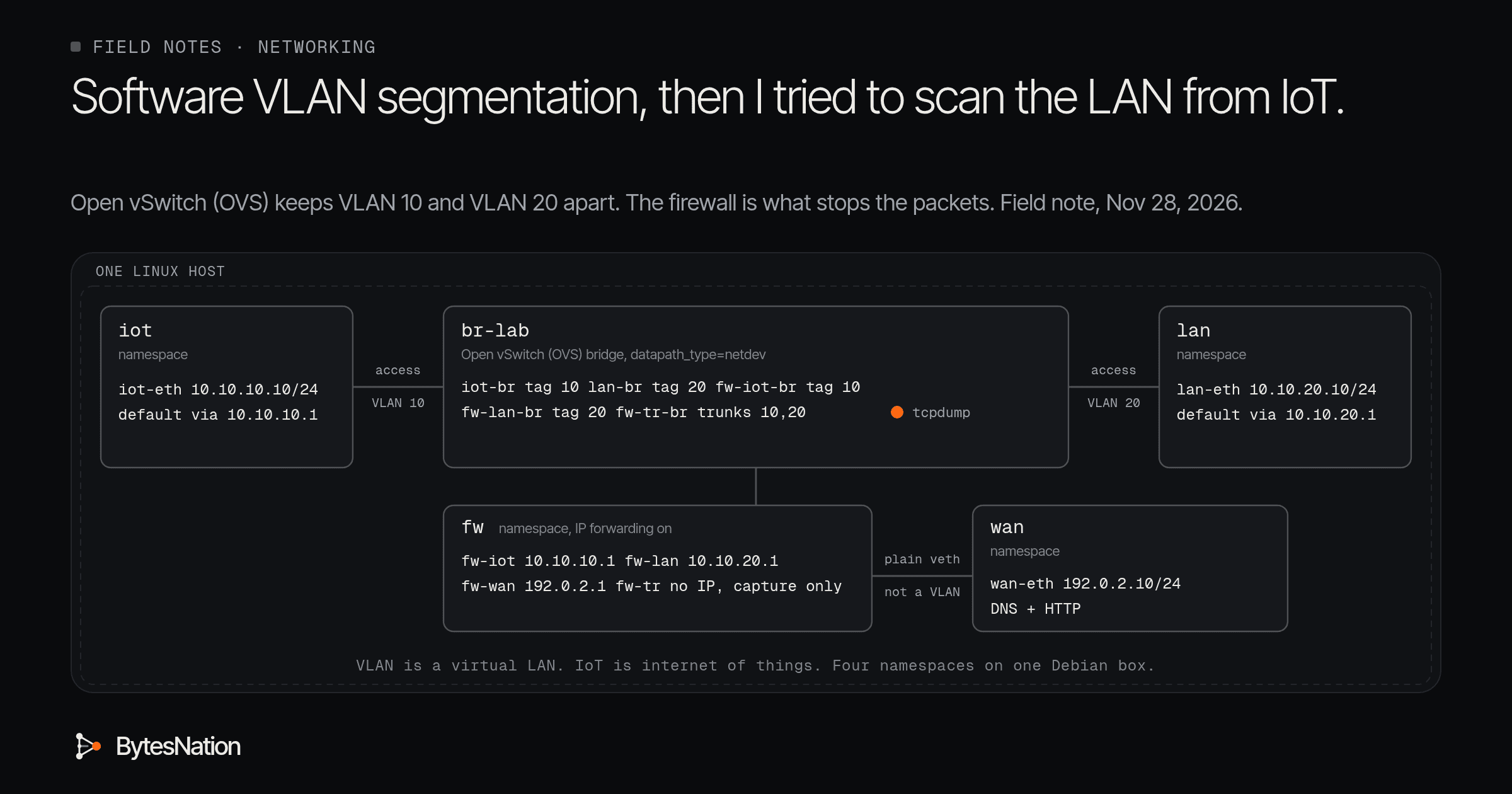
What You Will Build
- Four namespaces:
ioton VLANA virtual local area network that segments a single physical switch into multiple isolated broadcast domains without needing separate hardware. Read more → 10,lanon VLAN 20,fwas the router between them, andwanas a simulated internet with DNSThe system that translates human-readable domain names into IP addresses so devices can find each other on a network. Read more → and HTTP - An OVS bridge
br-labwith access ports for IoT, LAN, and the firewallA security device or software that monitors and controls incoming and outgoing network traffic based on predefined rules. Read more →, plus a trunk intofwused as a capture point - tcpdump proof that the trunk carries 802.1Q tags and the access ports do not
- An nftablesThe modern Linux kernel packet-filtering framework, managed with the nft command, replacing iptables. Read more → forward policy in
fwthat lets IoT reach the simulated internet and stops IoT from reaching the LAN - A before and after nmap from IoT, and a teardown that leaves the host as it was

| Namespace | Interface | Address | Role |
|---|---|---|---|
| iot | iot-eth | 10.10.10.10/24 | IoT host, access VLAN 10, gateway 10.10.10.1 |
| lan | lan-eth | 10.10.20.10/24 | LAN host, access VLAN 20, gateway 10.10.20.1 |
| fw | fw-iot, fw-lan, fw-wan | 10.10.10.1/24, 10.10.20.1/24, 192.0.2.1/24 | Router, IP forwarding on |
| fw | fw-tr | no address | Trunk capture, VLANs 10 and 20 |
| wan | wan-eth | 192.0.2.10/24 | Simulated internet, DNS and HTTP |
The WAN addresses come from the RFC 5737 documentation range 192.0.2.0/24, so they cannot collide with anything real. The bridge itself has no IP on the host.
Prerequisites
Parts and cost:
- One Linux host or VMA software-based emulation of a complete computer that runs its own operating system and applications, isolated from the host hardware. Read more → you can run sudo on. I used a Debian 13 VM with 8 vCPU and 15 GB RAM. The lab uses almost none of that.
- Cost: $0. Every tool is in the Debian archive.
Packages:
sudo apt install openvswitch-switch nftables nmap tcpdump ethtool dnsmasq-base bind9-dnsutils iputils-ping netcat-openbsd
Required knowledge:
- Comfortable with
ip addr,ip routeand reading tcpdump output - You know what a VLAN ID is, and that a router is what connects two of them
Open vSwitch 3.5.0, nftables v1.1.3, nmap 7.95, tcpdump 4.99.5, ethtool 6.14.2, dnsmasq 2.91, kernel 6.12.113+. The box has no systemd. PID 1 is tini, so the package postinst cannot start OVS for you. This kernel also has CONFIG_OPENVSWITCH and CONFIG_VLAN_8021Q unset, and there is no /lib/modules tree to load from.
Part 1: Start Open vSwitch by Hand
Install the packages, then notice that Debian tries and fails to start the service:
invoke-rc.d: could not determine current runlevel
invoke-rc.d: policy-rc.d denied execution of start.
The documented helper is /usr/share/openvswitch/scripts/ovs-ctl. A plain ovs-ctl start is not enough. It wants --system-id, and it also insists on loading the kernel module:
$ sudo /usr/share/openvswitch/scripts/ovs-ctl start
/etc/openvswitch/conf.db does not exist ... (warning).
Creating empty database /etc/openvswitch/conf.db.
Starting ovsdb-server.
system ID not configured, please use --system-id ... failed!
Configuring Open vSwitch system IDs.
modprobe: FATAL: Module openvswitch not found in directory /lib/modules/6.12.113+
Inserting openvswitch module ... failed!
ovsdb-server is running after that. ovs-vswitchd is not. Set a system ID with --no-wait, because ovs-vsctl otherwise sits and waits for a daemon that is not there. Then start ovs-vswitchd yourself:
sudo ovs-vsctl --no-wait set Open_vSwitch . external-ids:system-id="$(uuidgen)"
sudo ovs-vswitchd unix:/var/run/openvswitch/db.sock --pidfile --detach --log-file=/var/log/openvswitch/ovs-vswitchd.log
The log reports the missing module, and the process stays up anyway:
Generic Netlink family 'ovs_datapath' does not exist. The Open vSwitch kernel module is probably not loaded.
bridge|INFO|ovs-vswitchd (Open vSwitch) 3.5.0
What broke: the default datapath needs the kernel module
$ sudo ovs-vsctl --timeout=15 add-br br-sys
ovs-vsctl: Error detected while setting up 'br-sys'.  See ovs-vswitchd log for details.
The daemon log:
dpif|WARN|failed to create datapath ovs-system: No such file or directory
ofproto_dpif|ERR|failed to open datapath of type system: No such file or directory
bridge|ERR|failed to create bridge br-sys: No such file or directory
The fix is the userspace datapath, which Open vSwitch documents as datapath_type=netdev. The same page warns that userspace-only mode without DPDK is experimental and has not been thoroughly tested. It worked here. Every path below was checked on the wire.
sudo ovs-vsctl --if-exists del-br br-sys
sudo ovs-vsctl add-br br-lab -- set bridge br-lab datapath_type=netdev
sudo ip link set br-lab up
sudo ip link set ovs-netdev up
Do not add an IP to br-lab or ovs-netdev. Those devices stay on the host only so OVS has a datapath. Lab traffic stays in the namespaces.
Part 2: Build the VLANs
Create the four namespaces and the access ports first. Each veth has one end in a namespace and the other end as an OVS port on the host.
sudo ip netns add iot
sudo ip netns add lan
sudo ip netns add fw
sudo ip netns add wan
for n in iot lan fw wan; do sudo ip -n $n link set lo up; done

# IoT, access VLAN 10
sudo ip link add iot-eth type veth peer name iot-br
sudo ip link set iot-eth netns iot
sudo ip link set iot-br up
sudo ovs-vsctl add-port br-lab iot-br -- set port iot-br tag=10
sudo ip -n iot link set iot-eth up
sudo ip -n iot addr add 10.10.10.10/24 dev iot-eth
sudo ip -n iot route add default via 10.10.10.1

# LAN, access VLAN 20
sudo ip link add lan-eth type veth peer name lan-br
sudo ip link set lan-eth netns lan
sudo ip link set lan-br up
sudo ovs-vsctl add-port br-lab lan-br -- set port lan-br tag=20
sudo ip -n lan link set lan-eth up
sudo ip -n lan addr add 10.10.20.10/24 dev lan-eth
sudo ip -n lan route add default via 10.10.20.1
The original plan was a single trunk into fw, with Linux VLAN subinterfaces fw-tr.10 and fw-tr.20 as the router interfaces. That is the usual router-on-a-stick picture. This kernel cannot do it:
$ sudo ip -n fw link add link fw-tr name fw-tr.10 type vlan id 10
Error: Unknown device type.
CONFIG_VLAN_8021Q is not set, so ip link add type vlan has no driver. The trunk port itself still works, because OVS, not Linux, writes the tags. I left fw-tr in the firewall namespace as a capture point, and I gave the firewall two access ports instead, one on each VLAN. That is also a normal way to attach a software router to OVS. The VLANs still only meet inside fw.
# Trunk, capture only, no IP
sudo ip link add fw-tr type veth peer name fw-tr-br
sudo ip link set fw-tr netns fw
sudo ip link set fw-tr-br up
sudo ovs-vsctl add-port br-lab fw-tr-br -- set port fw-tr-br trunks=10,20
sudo ip -n fw link set fw-tr up

# Firewall access ports, one per VLAN
sudo ip link add fw-iot type veth peer name fw-iot-br
sudo ip link set fw-iot netns fw
sudo ip link set fw-iot-br up
sudo ovs-vsctl add-port br-lab fw-iot-br -- set port fw-iot-br tag=10
sudo ip -n fw link set fw-iot up
sudo ip -n fw addr add 10.10.10.1/24 dev fw-iot

sudo ip link add fw-lan type veth peer name fw-lan-br
sudo ip link set fw-lan netns fw
sudo ip link set fw-lan-br up
sudo ovs-vsctl add-port br-lab fw-lan-br -- set port fw-lan-br tag=20
sudo ip -n fw link set fw-lan up
sudo ip -n fw addr add 10.10.20.1/24 dev fw-lan

# Simulated internet, a plain veth, not on the bridge
sudo ip link add fw-wan type veth peer name wan-eth
sudo ip link set fw-wan netns fw
sudo ip link set wan-eth netns wan
sudo ip -n fw link set fw-wan up
sudo ip -n fw addr add 192.0.2.1/24 dev fw-wan
sudo ip -n wan link set wan-eth up
sudo ip -n wan addr add 192.0.2.10/24 dev wan-eth
sudo ip -n wan route add default via 192.0.2.1

sudo ip netns exec fw sysctl -w net.ipv4.ip_forward=1
ovs-vsctl show should now list tag: 10 on iot-br and fw-iot-br, tag: 20 on lan-br and fw-lan-br, and trunks: [10, 20] on fw-tr-br.
Turn off checksum offload on every veth, both the host end and the namespace end, before you test TCP. I learned this the hard way in Part 4. Do it now so your first nmap is trustworthy:
for dev in iot-br lan-br fw-iot-br fw-lan-br fw-tr-br; do
  sudo ethtool -K $dev tx off rx off tso off gso off gro off sg off
done
sudo ip netns exec iot ethtool -K iot-eth tx off rx off tso off gso off gro off sg off
sudo ip netns exec lan ethtool -K lan-eth tx off rx off tso off gso off gro off sg off
sudo ip netns exec fw ethtool -K fw-iot tx off rx off tso off gso off gro off sg off
sudo ip netns exec fw ethtool -K fw-lan tx off rx off tso off gso off gro off sg off
sudo ip netns exec fw ethtool -K fw-wan tx off rx off tso off gso off gro off sg off
sudo ip netns exec fw ethtool -K fw-tr tx off rx off tso off gso off gro off sg off
sudo ip netns exec wan ethtool -K wan-eth tx off rx off tso off gso off gro off sg off
ICMP already worked before that change. From IoT, the gateway is one hop and the LAN is two:
$ sudo ip netns exec iot ping -c 3 -W 1 10.10.10.1
64 bytes from 10.10.10.1: icmp_seq=1 ttl=127 time=0.807 ms
3 packets transmitted, 3 received, 0% packet loss

$ sudo ip netns exec iot ping -c 3 -W 1 10.10.20.10
64 bytes from 10.10.20.10: icmp_seq=1 ttl=126 time=0.449 ms
3 packets transmitted, 3 received, 0% packet loss
Part 3: Prove the Tags
Flush the neighbor tables so ARP has to happen again, then capture three places at once: the trunk, the IoT access port, and the LAN access port.
sudo ip netns exec iot ip neigh flush all
sudo ip netns exec lan ip neigh flush all
sudo ip netns exec fw ip neigh flush all

sudo ip netns exec fw  tcpdump -i fw-tr   -nn -e -tttt -c 50 -w trunk.pcap &
sudo ip netns exec iot tcpdump -i iot-eth -nn -e -tttt -c 40 -w iot-access.pcap &
sudo ip netns exec lan tcpdump -i lan-eth -nn -e -tttt -c 40 -w lan-access.pcap &

sudo ip netns exec iot ping -c 2 -W 1 10.10.10.1
sudo ip netns exec lan ping -c 2 -W 1 10.10.20.1
sudo ip netns exec iot ping -c 2 -W 1 10.10.20.10
On the trunk, the ARP requests carry an 802.1Q header. VLAN 10 and VLAN 20 are both visible, and they are not mixed into one untagged stream:
$ sudo tcpdump -nn -e -tttt -r trunk.pcap
2026-11-20 13:31:06.132993 c2:ca:b8:13:f2:e9 > ff:ff:ff:ff:ff:ff, ethertype 802.1Q (0x8100), length 46: vlan 10, p 0, ethertype ARP (0x0806), Request who-has 10.10.10.1 tell 10.10.10.10
2026-11-20 13:31:07.175212 ba:6c:8e:0b:78:d5 > ff:ff:ff:ff:ff:ff, ethertype 802.1Q (0x8100), length 46: vlan 20, p 0, ethertype ARP (0x0806), Request who-has 10.10.20.1 tell 10.10.20.10
On iot-eth, the same ARP is untagged. So is the ICMP that follows. The access port never shows ethertype 802.1Q.
On lan-eth, the VLAN 10 ARP does not appear at all. When IoT later pings 10.10.20.10, the LAN host does see the ICMP, but the source MAC is the firewall’s fw-lan address ea:6e:55:97:f3:fe, not the IoT MAC c2:ca:b8:13:f2:e9. L2 stayed isolated. The router is what crossed the VLANs.
Once OVS learns a unicast MAC, later ICMP on that VLAN is not flooded to the trunk. The two tagged ARP frames are the useful evidence. You do not need a SPAN port for this test.
Part 4: What Broke, Before nmap Could Be Trusted
I started listeners and nmap’d too early. Ping to the LAN and to 192.0.2.10 was clean. TCP and DNS were not. nmap reported every port filtered with no-response, and dig @192.0.2.10 lab.example timed out. tcpdump on the LAN host showed the SYN arriving, then nothing going back:
10.10.10.10.57118 > 10.10.20.10.80: Flags [S], cksum 0x3256 (incorrect -> 0xced9), seq 3703143220, win 64240, ...The packet crossed OVS and the firewall. The LAN kernel dropped it as a bad checksum. veth checksum offload was on, and the userspace datapath does not complete a checksum the way a NIC would. After ethtool -K ... tx off rx off tso off gso off gro off sg off on both ends of every veth, the same connect succeeded and DNS came back:
$ sudo ip netns exec iot nc -n -v -w 2 10.10.20.10 80
Connection to 10.10.20.10 80 port [tcp/*] succeeded!

$ sudo ip netns exec iot dig +time=1 +tries=1 +short @192.0.2.10 lab.example
192.0.2.10
If you skipped the ethtool block in Part 2, run it before you continue. A “filtered” nmap result is not evidence until a SYN on the wire has a correct checksum.
Part 5: Drop IoT to LAN, Keep IoT to the Internet
Services in this run: a tiny TCP banner server on LAN ports 22 and 80, the same on IoT port 80 and WAN port 80, and dnsmasq on 192.0.2.10 answering lab.example with 192.0.2.10. Before any nftables policy, fw had an empty ruleset. Forwarding used the kernel default, which is accept.

$ sudo ip netns exec iot nmap -n -sT -p 22,80,443 --reason --host-timeout 15s 10.10.20.10
Starting Nmap 7.95 ( https://nmap.org ) at 2026-11-20 13:33 EST
Nmap scan report for 10.10.20.10
Host is up, received echo-reply ttl 126 (0.00082s latency).

PORT    STATE  SERVICE REASON
22/tcp  open   ssh     syn-ack
80/tcp  open   http    syn-ack
443/tcp closed https   conn-refused

Nmap done: 1 IP address (1 host up) scanned in 0.10 seconds

$ sudo ip netns exec iot nmap -n -sT -p 22,53,80 --reason --host-timeout 15s 192.0.2.10
Starting Nmap 7.95 ( https://nmap.org ) at 2026-11-20 13:33 EST
Nmap scan report for 192.0.2.10
Host is up, received echo-reply ttl 126 (0.00057s latency).

PORT   STATE  SERVICE REASON
22/tcp closed ssh     conn-refused
53/tcp open   domain  syn-ack
80/tcp open   http    syn-ack
IoT can already reach the LAN. The WAN host is also reachable, including DNS and HTTP. Now load a policy in the fw namespace only. It never touches the host’s ruleset.
# fw.nft, applied with: sudo ip netns exec fw nft -f fw.nft
flush ruleset

table inet filter {
    chain input {
        type filter hook input priority filter; policy accept;
    }
    chain output {
        type filter hook output priority filter; policy accept;
    }
    chain forward {
        type filter hook forward priority filter; policy drop;

        ct state established,related counter accept

        ip saddr 10.10.10.0/24 ip daddr 192.0.2.0/24 icmp type echo-request counter accept
        ip saddr 10.10.10.0/24 ip daddr 192.0.2.0/24 udp dport 53 counter accept
        ip saddr 10.10.10.0/24 ip daddr 192.0.2.0/24 tcp dport 53 counter accept
        ip saddr 10.10.10.0/24 ip daddr 192.0.2.0/24 tcp dport 80 counter accept

        ip saddr 10.10.20.0/24 ip daddr 192.0.2.0/24 counter accept
        ip saddr 10.10.20.0/24 ip daddr 10.10.10.0/24 counter accept

        ip saddr 10.10.10.0/24 ip daddr 10.10.20.0/24 counter drop
    }
}
The default forward policy is drop. IoT may start ICMP, DNS, and HTTP to 192.0.2.0/24. The LAN may reach IoT and the internet. IoT to LAN is dropped, with a counter you can read back. After loading that file:
$ sudo ip netns exec iot ping -c 3 -W 1 10.10.20.10
3 packets transmitted, 0 received, 100% packet loss, time 2049ms

$ sudo ip netns exec iot nmap -n -sT -p 22,80,443 --reason --host-timeout 15s 10.10.20.10
Starting Nmap 7.95 ( https://nmap.org ) at 2026-11-20 13:33 EST
Note: Host seems down. If it is really up, but blocking our ping probes, try -Pn
Nmap done: 1 IP address (0 hosts up) scanned in 3.08 seconds

$ sudo ip netns exec iot nmap -n -Pn -sT -p 22,80,443 --reason --host-timeout 15s 10.10.20.10
Starting Nmap 7.95 ( https://nmap.org ) at 2026-11-20 13:33 EST
Nmap scan report for 10.10.20.10
Host is up, received user-set.

PORT    STATE    SERVICE REASON
22/tcp  filtered ssh     no-response
80/tcp  filtered http    no-response
443/tcp filtered https   no-response

$ sudo ip netns exec iot ping -c 3 -W 1 192.0.2.10
64 bytes from 192.0.2.10: icmp_seq=1 ttl=126 time=0.590 ms
3 packets transmitted, 3 received, 0% packet loss

$ sudo ip netns exec iot nmap -n -sT -p 22,53,80 --reason --host-timeout 15s 192.0.2.10
Starting Nmap 7.95 ( https://nmap.org ) at 2026-11-20 13:33 EST
Nmap scan report for 192.0.2.10
Host is up, received echo-reply ttl 126 (0.00045s latency).

PORT   STATE    SERVICE REASON
22/tcp filtered ssh     no-response
53/tcp open     domain  syn-ack
80/tcp open     http    syn-ack

$ sudo ip netns exec iot dig +time=1 +tries=1 +short @192.0.2.10 lab.example
192.0.2.10
Port 22 on the WAN host is filtered, not closed, because the policy never allows IoT to that port. DNS and HTTP still work. From the LAN, IoT is still reachable. Ping succeeded, and after I restarted the IoT listener, nmap showed 80/tcp open syn-ack. The first try after the policy showed closed because the IoT listener was already gone after an earlier connect scan. I did not capture a traceback. The script has no handler around sendall, so a reset from nmap would exit the process. That was a bug in the test server, not the firewall. Counters after the probes were:
ct state established,related                          packets 25 bytes 1592 accept
ip saddr 10.10.10.0/24 ip daddr 192.0.2.0/24 icmp     packets  2 bytes  112 accept
ip saddr 10.10.10.0/24 ip daddr 192.0.2.0/24 udp 53   packets  1 bytes   80 accept
ip saddr 10.10.10.0/24 ip daddr 192.0.2.0/24 tcp 53   packets  1 bytes   60 accept
ip saddr 10.10.10.0/24 ip daddr 192.0.2.0/24 tcp 80   packets  2 bytes  100 accept
ip saddr 10.10.20.0/24 ip daddr 192.0.2.0/24          packets  1 bytes   84 accept
ip saddr 10.10.20.0/24 ip daddr 10.10.10.0/24         packets  6 bytes  296 accept
ip saddr 10.10.10.0/24 ip daddr 10.10.20.0/24         packets 17 bytes  916 drop
Those 17 dropped packets are the pings and the two nmap attempts from IoT to the LAN.
Teardown and Rollback
Stop the listeners and dnsmasq, then remove the bridge, the leftover veths, the namespaces, and the daemons. ovs-vsctl del-br br-lab deletes the OVS ports. It does not delete the veth devices. Do that yourself, then delete the namespaces, then stop OVS.
sudo ovs-vsctl del-br br-lab
sudo ip link del iot-br
sudo ip link del lan-br
sudo ip link del fw-tr-br
sudo ip link del fw-iot-br
sudo ip link del fw-lan-br
sudo ip netns del iot
sudo ip netns del lan
sudo ip netns del fw
sudo ip netns del wan
sudo /usr/share/openvswitch/scripts/ovs-ctl stop
After teardown, ip netns list was empty, the host had no 10.10.0.0/16 or 192.0.2.0/24 routes, and the remaining interfaces were lo, enp0s3, and a down docker0 that was already there from an earlier lab and was not touched. sudo nft list ruleset on the host was empty. The fw policy lived only inside the deleted namespace. ovs-vsctl show failed with database connection failed (No such file or directory), which is what you want after the daemons exit.
Common Pitfalls
ovs-ctl startwithout--system-idfails, and even with it the script still tries to insert the kernel module. Ifmodprobe openvswitchfails, startovs-vswitchdby hand and usedatapath_type=netdev.ovs-vsctl sethangs whileovs-vswitchdis down. Use--no-waituntil the daemon is running, or pass--timeout.- Linux VLAN subinterfaces need
CONFIG_VLAN_8021Q. Ifip link add type vlansaysUnknown device type, give the router one access port per VLAN and keep a trunk only if you want to watch tags. - Leave checksum offload on and TCP looks like a firewall problem. It is not. Check the SYN checksum in tcpdump before you change any policy.
- Do not attach
enp0s3or any other real uplink tobr-lab. Open vSwitch’s userspace guide also notes that a physical NIC in the userspace datapath still delivers copies into the host stack. This lab never added a host NIC to the bridge. del-brdoes not remove veths. Delete them, then delete the namespaces, or they linger on the host.
Summary
| Test | Before nftables | After nftables |
|---|---|---|
| IoT ping LAN 10.10.20.10 | 0% loss, ttl 126 | 100% loss |
| IoT nmap LAN 22, 80, 443 | 22 open, 80 open, 443 closed | host seems down; with -Pn, all filtered |
| IoT ping WAN 192.0.2.10 | 0% loss | 0% loss |
| IoT nmap WAN 22, 53, 80 | 22 closed, 53 open, 80 open | 22 filtered, 53 open, 80 open |
| IoT dig lab.example @192.0.2.10 | 192.0.2.10 | 192.0.2.10 |
| LAN ping and nmap IoT :80 | open | still open |
A VLAN on the switch is not a policy. It stops L2. After that, the router is the whole story. The before and after nmap only became meaningful once the checksums were right. Look at the frame before you trust the scanner.
Sources
- Open vSwitch, “Isolating VM Traffic Using VLANs”, https://docs.openvswitch.org/en/stable/howto/vlan/, stable docs 4.0.0, last modified Aug 17, 2026, accessed Nov 20, 2026. This run used Debian’s Open vSwitch 3.5.0. Access ports use
tag=. Ports are trunks by default. - Open vSwitch, “Basic Configuration” FAQ, https://docs.openvswitch.org/en/stable/faq/configuration/, stable docs 4.0.0, last modified Aug 17, 2026, accessed Nov 20, 2026
- Open vSwitch, “Open vSwitch without Kernel Support”, https://docs.openvswitch.org/en/stable/intro/install/userspace/, stable docs 4.0.0, last modified Aug 17, 2026, accessed Nov 20, 2026. Documents
datapath_type=netdev, calls userspace-only mode without DPDK experimental, and warns that a physical NIC in that datapath still delivers packets into the host stack. - ovs-vsctl(8) and ovs-vswitchd(8), Debian trixie openvswitch-switch 3.5.0-1+b1, https://manpages.debian.org/trixie/openvswitch-switch/ovs-vsctl.8.en.html, last modified Oct 26, 2026, accessed Nov 20, 2026
- nftables wiki, “Simple ruleset for a home router”, https://wiki.nftables.org/wiki-nftables/index.php/Simple_ruleset_for_a_home_router, last edited Dec 8, 2021, accessed Nov 20, 2026
- nftables wiki, “Configuring chains”, https://wiki.nftables.org/wiki-nftables/index.php/Configuring_chains, last edited Oct 8, 2024, accessed Nov 20, 2026. Default chain policy is accept unless you set drop.
- nftables wiki, “Matching connection tracking stateful metainformation”, https://wiki.nftables.org/wiki-nftables/index.php/Matching_connection_tracking_stateful_metainformation, accessed Nov 20, 2026
- nft(8), Debian trixie nftables 1.1.3-1, https://manpages.debian.org/trixie/nftables/nft.8.en.html, last modified Oct 13, 2026, accessed Nov 20, 2026
- ethtool(8), Debian trixie ethtool 1:6.14.2-1, https://manpages.debian.org/trixie/ethtool/ethtool.8.en.html, last modified Oct 30, 2026, accessed Nov 20, 2026
- Linux kernel documentation, “Checksum Offloads”, https://www.kernel.org/doc/html/latest/networking/checksum-offloads.html, last modified Nov 15, 2026, accessed Nov 20, 2026
- ip-netns(8), Debian trixie iproute2 6.15.0-1, https://manpages.debian.org/trixie/iproute2/ip-netns.8.en.html, last modified Nov 4, 2026, accessed Nov 20, 2026
- RFC 5737, “IPv4 Address Blocks Reserved for Documentation”, January 2010
- IEEE Std 802.1Q, virtual bridged LANs and the VLAN tag